Showing posts with label google chrome. Show all posts

Thursday, 21 December 2017

Google Chrome 64 brings a host of new features

Ads, autoplaying videos and pop ups are required on the internet but when they used in unintended manners, they can prove to be a headache to the users of the internet. Google has noticed that the biggest user complaints about Chrome for desktop is that users have to deal with a truckload of ads. The company looks to tackle the problem with Google Chrome 64.

What is in the new update?


The beta Google Chrome 64 update was released only a couple of days ago. Of course, the major headline of the update is its improved pop up blocker but it does have plenty of other significant changes.

Google is targeting annoying redirects that are disguised “play buttons” and “close”. These ads fool users into clicking them, which then directs them to other websites. Google says that Chrome will prevent these “abusive experiences” with version 64. However, its effectiveness remains to be seen. These ads are known to be difficult to remove.

Another handy feature on Google Chrome 64 is that you are given an auto mute option when it comes to auto playing videos. This is located within the site settings menu on the browser. Its located in the same place you will find Javascript and Flash enabling options. To access it, simply click on the green lock present next to a website’s URL. The downside of the feature is that you will have to enable it per website. This can be quite annoying for those who are doing some heavy surfing. But for those whose headphones, this is a vastly helpful feature.

The rest of the features include HDR support for those in HDR mode on Windows 10 and Split View multitasking features in tablet mode.

The Chrome Beta 64 is not yet available for Android but the regular version for desktops will be released in the upcoming few days.

Tuesday, 19 September 2017

Google Chrome will no longer autoplay videos

Major changes are coming to Google Chrome in the next few months. Google Chrome will gain abilities to minimize the impact of annoying auto play videos. Starting in January next year, the browser will no longer auto play videos.

The exceptions are if they"re muted and don"t have sound or you"ve shown interest in watching them. The feature will roll out to users with Chrome 64. Chrome 63 does come with its own muting feature too. It is available from October onwards. It gives the user the ability to mute an entire website.

You might wonder what Google Chrome considers as "showing interest in auto playing videos?". When it comes to mobile, it will auto play files only on websites that are present on the home screen of your device. On the desktop version, it will play videos from websites that you usually play media from.

Google says the feature will "unify desktop and mobile web behaviour". Furthermore, they say that the changes "will give users greater control over media playing in their browser. It will also make it easier for publishers to implement auto play where it benefits the user." According to a post on the Chromium Blog, this will “allow auto play to occur when users want media to play, and respect users" wishes when they don"t”.

This is great news for anyone using the internet. We have all come across sites where media starts blaring, regardless of whether you wanted it to or not.

Blocking auto playing videos has more benefits than just the user experience. It can also help improve the battery life of mobile devices and cut down on data usage, especially for those on limited internet packages. Another nice side effect could be content creators working harder to make videos that you actually want to watch.

Friday, 15 September 2017

Upcoming versions of Google Chrome will let you permanently mute sites, block autoplaying videos

One of the most annoying things about surfing today’s web – besides all those ads, of course – is landing on a site and getting blasted by a video that starts playing automatically. Not only does the experience surprise and annoy web users, it can also consume power and use data – which is concerning for mobile users, in particular. Now Google says it will do something about the problem. In the upcoming version of the Google Chrome web browser (Chrome 64), Google will limit the ability for sites to autoplay videos.

As the company explains in a blog post, autoplay will only be allowed when the media itself doesn’t include sound, or when the user has indicated an interest in the media. In that latter case, user interest can be determined by a variety of factors. For example: if the user has frequently played the media on the site before when visiting from the desktop browser; if they’ve tapped or clicked on the screen during the browsing session; or if they’ve added the site to their home screen on mobile.

However, at the same time, Google is disabling some of its protections against autoplay for mobile users. On Chrome for Android, it’s removing the ‘block autoplay’ setting that’s currently available, and it will also remove autoplay blocking on mobile when the Data Saver mode is enabled.

The company says that, by doing so, it will make this new “muted autoplay” more reliable. In reality, though, that means if you’ve already taken a specific action to block autoplay videos on mobile, you might actually see them play more often as a result of the changes if you’re not careful.

There will be some help on that front, however. In addition to the changes coming to Chrome 64, Google will also introduce a new user option within Chrome 63 that will allow you to completely disable audio for individual sites. That means if you have a favorite site whose content you like, but that’s abusing autoplay video – perhaps a news site or one with informative reviews – you can simply opt to have that site muted indefinitely.

This change will persist even when you close your browser session, and then later return, Google notes.

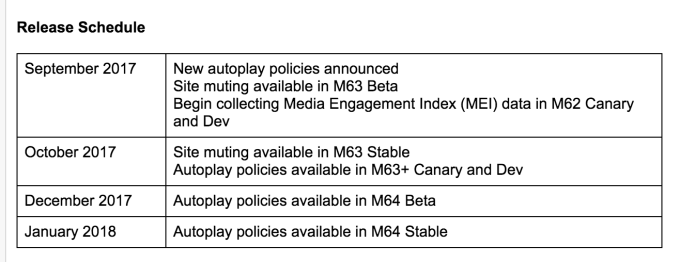
Google Chrome Release Schedule

Site muting will arrive in the stable version of Chrome 63 in October, while the new autoplay policies will arrive in Chrome 64 (beta build) in December, and then to the stable build of Chrome 64 in January 2018.

Autoplay video isn’t the only internet scourge Google plans to address in the near future. The company has already been developing a native ad blocker for Chrome, which popped up in the Android developer build earlier this summer.

That feature will choose the ads to block based on guidelines from the industry group, Coalition for Better Ads. It will include blocking ads like repeated pop-ups or those that prevent you from seeing content until a countdown timer completes, among other things. This ad filter is also set to arrive next year.

Upcoming versions of Google Chrome will let you permanently mute sites, block autoplaying videos

One of the most annoying things about surfing today’s web – besides all those ads, of course – is landing on a site and getting blasted by a video that starts playing automatically. Not only does the experience surprise and annoy web users, it can also consume power and use data – which is concerning for mobile users, in particular. Now Google says it will do something about the problem. In the upcoming version of the Google Chrome web browser (Chrome 64), Google will limit the ability for sites to autoplay videos.

As the company explains in a blog post, autoplay will only be allowed when the media itself doesn’t include sound, or when the user has indicated an interest in the media. In that latter case, user interest can be determined by a variety of factors. For example: if the user has frequently played the media on the site before when visiting from the desktop browser; if they’ve tapped or clicked on the screen during the browsing session; or if they’ve added the site to their home screen on mobile.

However, at the same time, Google is disabling some of its protections against autoplay for mobile users. On Chrome for Android, it’s removing the ‘block autoplay’ setting that’s currently available, and it will also remove autoplay blocking on mobile when the Data Saver mode is enabled.

The company says that, by doing so, it will make this new “muted autoplay” more reliable. In reality, though, that means if you’ve already taken a specific action to block autoplay videos on mobile, you might actually see them play more often as a result of the changes if you’re not careful.

There will be some help on that front, however. In addition to the changes coming to Chrome 64, Google will also introduce a new user option within Chrome 63 that will allow you to completely disable audio for individual sites. That means if you have a favorite site whose content you like, but that’s abusing autoplay video – perhaps a news site or one with informative reviews – you can simply opt to have that site muted indefinitely.

This change will persist even when you close your browser session, and then later return, Google notes.

Google Chrome Release Schedule

Site muting will arrive in the stable version of Chrome 63 in October, while the new autoplay policies will arrive in Chrome 64 (beta build) in December, and then to the stable build of Chrome 64 in January 2018.

Autoplay video isn’t the only internet scourge Google plans to address in the near future. The company has already been developing a native ad blocker for Chrome, which popped up in the Android developer build earlier this summer.

That feature will choose the ads to block based on guidelines from the industry group, Coalition for Better Ads. It will include blocking ads like repeated pop-ups or those that prevent you from seeing content until a countdown timer completes, among other things. This ad filter is also set to arrive next year.

Sunday, 20 August 2017

Using the Samsung Internet Browser

Samsung recently caused stirs in the tech world when it released its beta Samsung Internet Browser. Not just to Samsung devices but to every Android device out there. It does make sense as a large number of devices in the market are non samsung. If you are out looking for a internet browser, this might cut it. Lets find out!


Samsung Internet Browser vs Google Chrome


Google Chrome is the most used browser right now. If the Samsung Internet Browser wants to break into the top, it has to topple Google Chrome.


To start off with, Samsung has a better UI than Google Chrome. Most of the UI is at the bottom of the screen where it is easier for the thumb and fingers to reach. Smart eh? Plus, Samsung adds a Quick menu which is used to access some other functions with a couple of taps. This quick menu floats, much like Facebook’s chat heads on either the left or the right side. It is also optional.


When it comes to privacy, security and ad blocking, Samsung ticks all the boxes here too. It offers a Secret Mode. This means your browsing history will not be recorded. It is also possible to password protect the Secret Mode. Add to that, DuckDuckGo is an option for default searching in the app. If you’re not familiar with DuckDuckGo, it’s a search engine that emphasizes privacy, and doesn’t feed you personalized ads based on searches. Basically, it’s the anti-Google search engine. It also offers an array of ad blocking applications that a person can make use of if they don"t like ads popping up on the screen.

[caption id="attachment_4451" align="alignnone" width="841"]Videos on the Samsung Internet Browser Videos on the Samsung Internet Browser[/caption]

Videos on the Samsung Internet Browser


You have the ability to pop out the video when you are watching embedded videos. This is much easier than dealing with embedded videos on Google Chrome.