Showing posts with label open. Show all posts

Saturday, 3 February 2018

Open any app or folder on your Mac with custom shortcuts or gestures

In the Mac"s earliest days, its key differentiator was a heavy reliance on the mouse and a desktop metaphor. Although other systems existed with windows and pointers, the vast majority of computers back then were controlled by you typing in commands.

If you wanted to move to a new directory or delete a document, you had to remember the arcane command for doing so, and all feedback you got would be text-based, too. With the Mac, you just clicked and dragged. Easy.

But this line of thinking somewhat negates the power of the keyboard. Moving a cursor is slow, but pressing a key is fast - hence why Apple twinned most commands with keyboard shortcuts. So while you can make a trip to File > Open to open a new document, you should try to weld Command + O to your muscle memory, thereby saving a few seconds every time that action is performed.

The snag is not every action has a keyboard shortcut - including many of the more abstract concepts that you may perform many times per day. For example, to use the keyboard to quickly access a particular app, folder or document, your best bet with macOS is Spotlight - and the likelihood of it immediately giving you what you"re after is slim.

With BetterTouchTool, however, you can start using the keyboard to open anything that"s on your Mac. Here"s how…

Launch apps using your keyboard and BetterTouchTool


Once BetterTouchTool is installed and launched, you"ll see its icon in your menu bar. Click that and select Preferences to open up the main window. The strip under the toolbar shows the many input devices that BetterTouchTool can work with. Let"s start by choosing Keyboard.
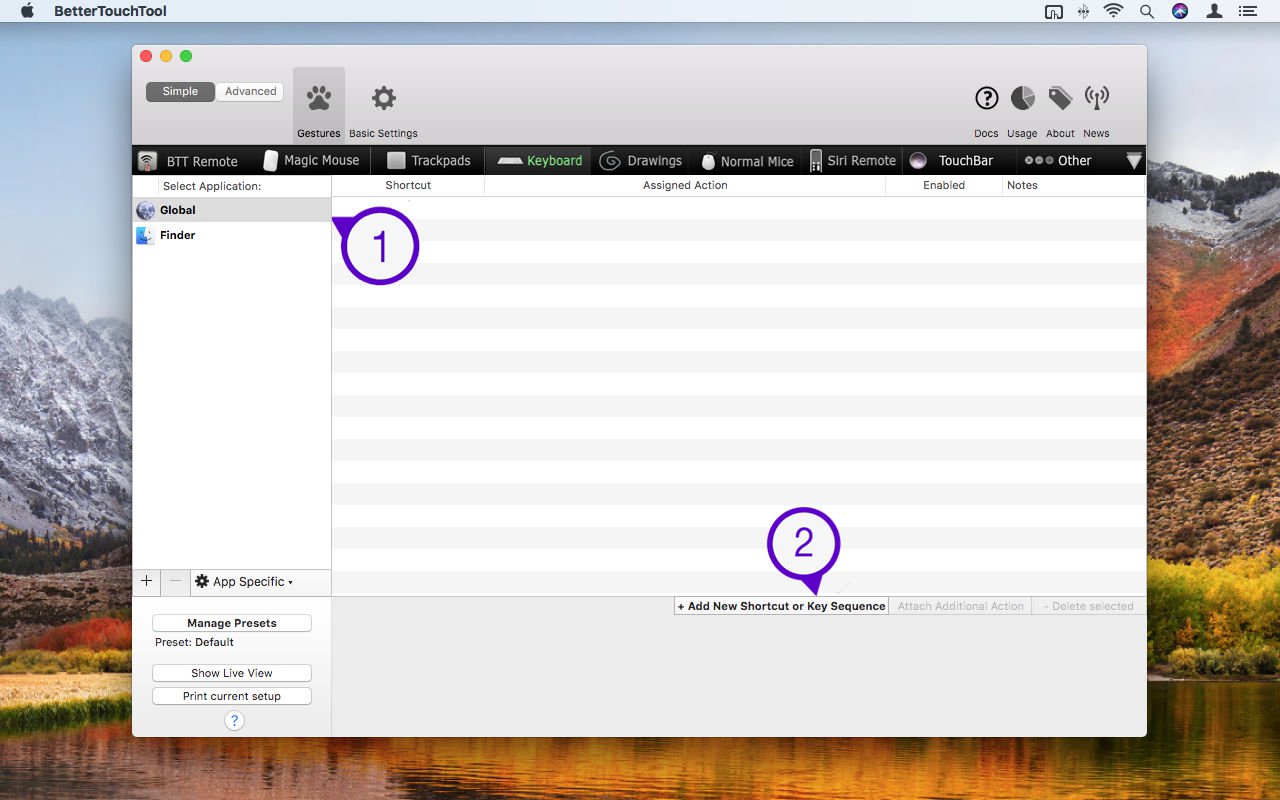


The range of any action defined in BetterTouchTool can be global (system-wide) in nature or restricted to a single application, depending on the selection you make for it in the sidebar. For opening apps and the like, stick with Global, because we want to be able to open an app whatever we happen to be doing at the time.

We"ll start with a shortcut to open Safari. Click Add New Shortcut or Key Sequence. You"ll now see a Shortcut tab, within which is a Click to record shortcut field.

At this point, you need to think carefully about the shortcut you"re going to define. It cannot be something that will clash with existing shortcuts elsewhere, and it also needs to be memorable, and relatively easily accessible for your fingers. If you"re going to define a large number of shortcuts, it"s also wise to create a system that you can apply to many more actions.
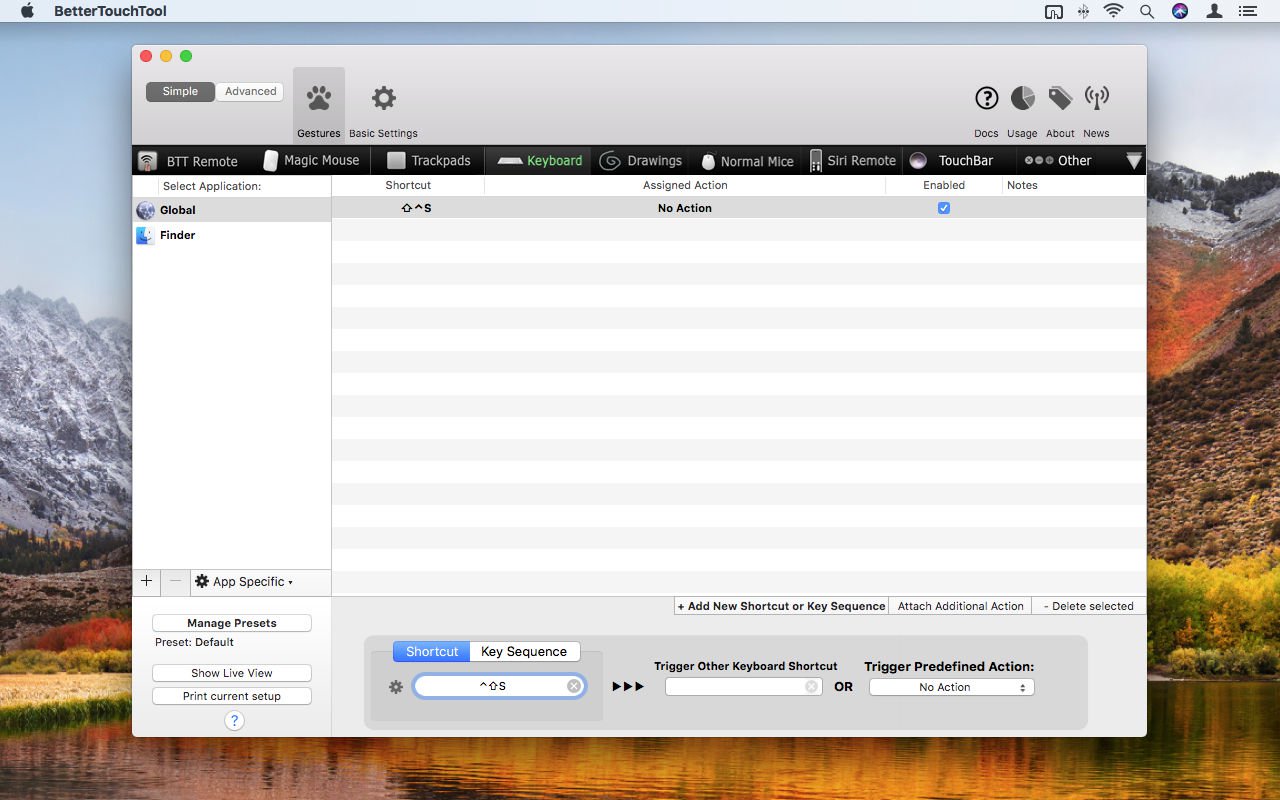


A good combination of keys to use is Control, Shift, and an identifying letter that for you represents the application you"re targeting. So for Safari, click in the aforementioned field and press Control + Shift + S.

Next, you need to select an action for your shortcut. Click the Trigger Predefined Action menu, type app into the search field, and double-click to choose Open Application / File / Apple Script [sic] from the listed results. A sheet will then appear, enabling you to navigate to and select Safari.
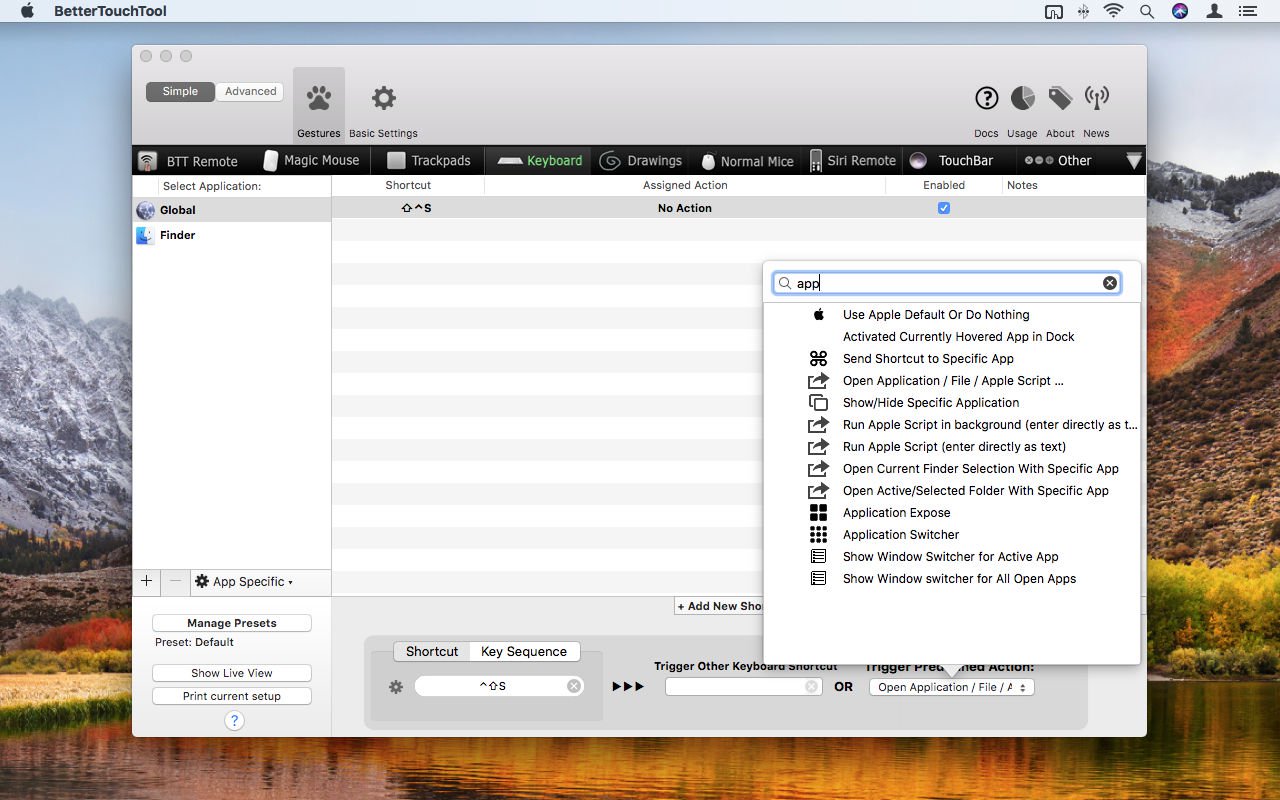
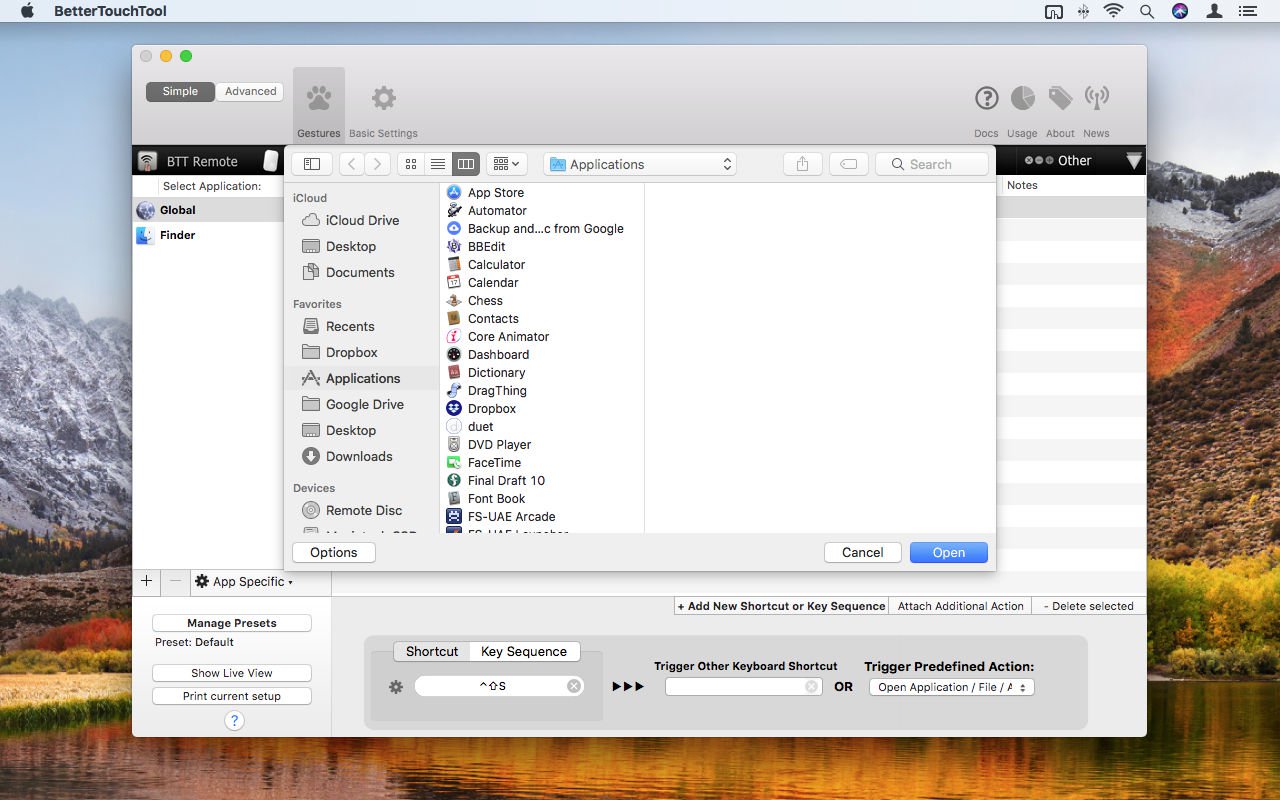


In BetterTouchTool, you should now see your defined shortcut under the Shortcut column header, and Launch Safari.app under Assigned Action. Assuming Enabled is ticked for this shortcut, Safari will launch whenever the shortcut is used; or, if Safari is already open, it will be brought to the front.

You can now add further shortcuts for other apps you regularly use; try Control + Shift + M for Mail, and Control + Shift + C for Calendar. Be mindful that you cannot use the same letter for multiple items. If you have already assigned the most obvious letter to another app - such as P for Photos - think of something else will work for a given app - like V for Preview.

Launch folders with gestures using BetterTouchTool


You can of course launch folders and individual documents in the same way as apps. Should you wish to do so, it might be wise to consider a different modifier key scheme for them, such as using Control + Option or Shift + Option instead of Control+Shift.

Alternatively, you can use trackpad gestures to open items. It"s worth noting that there are fewer obvious gestures than letters in the alphabet, and so this method is worth restricting to a few key folders, such as Documents or Applications.

Let"s make a gesture to open the Applications folder. Click Trackpads in the strip under the BetterTouchTool toolbar, and click Add New Gesture. Click Please Select a Gesture, and under Three Finger Gestures, select TipTap Left (2 Fingers Fix). You"ll see a little animation play of how the gesture works - in short, you place two fingers on the trackpad and then tap to the left of them.
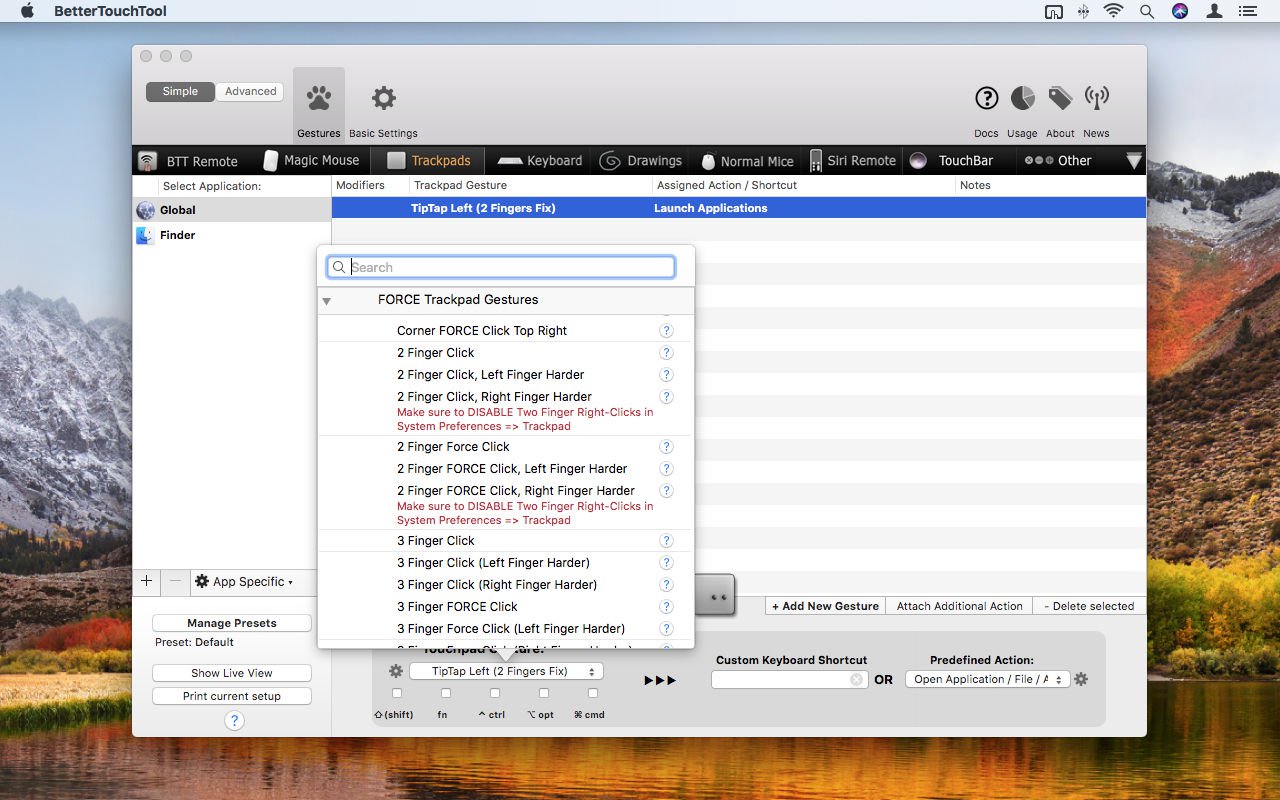


Click the menu under Predefined Action, type file in the search field, and again choose the Open Application / File / Apple Script [sic] action. This time, choose your Applications menu when the sheet opens. Use your gesture and the Applications window should immediately open.
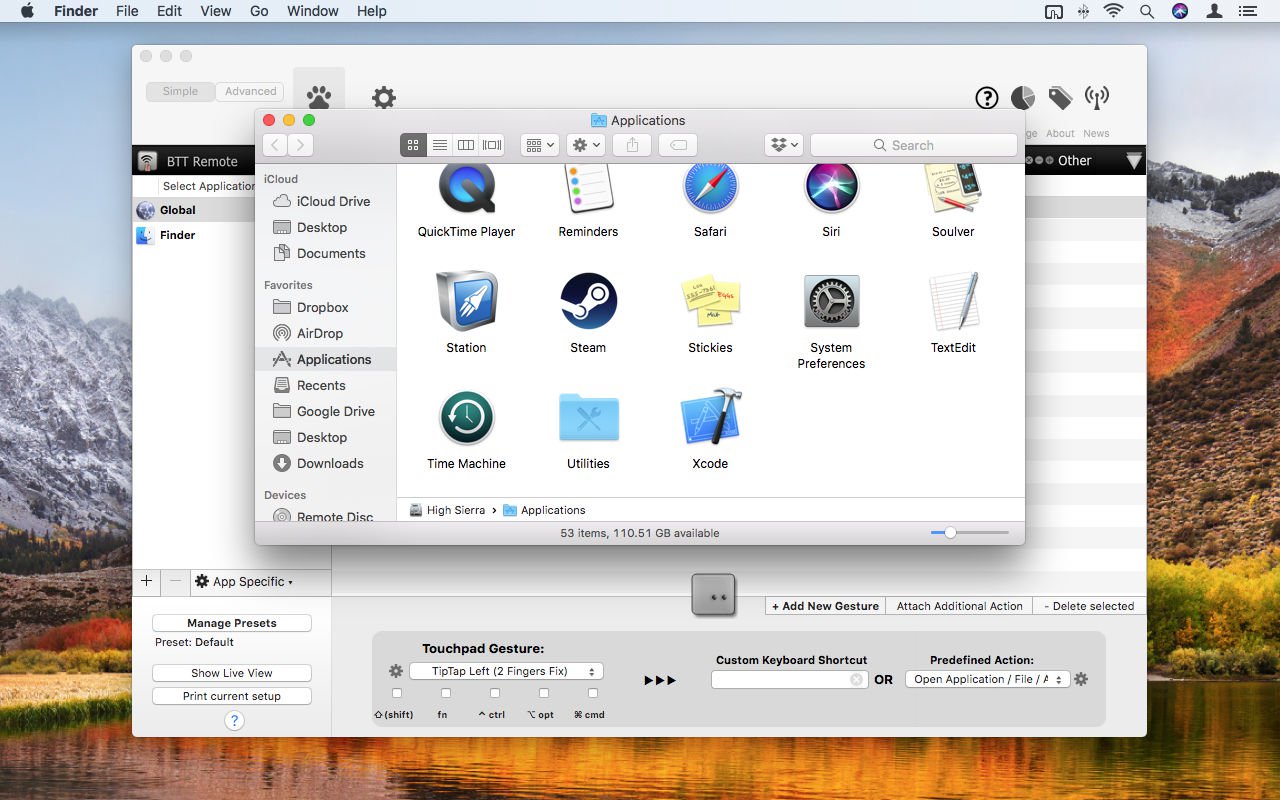


Complex gestures might take a while to become second nature, but BetterTouchTool"s selection is worth exploring. If you"ve a very recent Apple trackpad, there are all sorts of Force Touch options, meaning you could have clicks on specific areas of your trackpad launch certain items. If you don"t want them being launched by mistake, you can have the actions only trigger when a specific modifier key is also held - simply tick the relevant box under the Touchpad Gesture menu.

Beyond this, the sky"s the limit. BetterTouchTool provides all kinds of options for working with your mouse, the Siri Remote, the TouchBar, and even macOS window buttons. Using it for launching is only scratching the surface, given the huge amount of actions that are available. However, even if you do only use the app for getting at your favourite apps, documents and folders, it"ll save you time every day, and make you slightly more efficient on your Mac - and that can only be a good thing.

BetterTouchTool has a free trial, and costs as little as £4 for a permanent licence.

Thursday, 11 January 2018

How to open a Mac app from an unidentified developer

Apple devices tend not to like it when you try to install software that the company hasn"t vetted. iPhones and iPads won"t do it at all unless you jailbreak them, and even Macs do so only under protest.

By default macOS allows you to open apps from the official App Store only, and even if you go into System Preferences > Security & Privacy and change the setting for "Allow apps downloaded from" to "App Store and identified developers" you"ll still be prevented from opening anything macOS doesn"t recognise.

This all helps improve security, since dodgy apps are a common malware vector, but can be a pain if you"ve obtained software from a trusted but unofficial source and just want to run it with no fuss. Fortunately, it"s straightforward enough to override macOS"s security measures and install and open an app from an unidentified developer.

But be warned: do this only if you are satisfied that the developer and software (and the means of distribution, since innocent apps can be hijacked by guilty parties) are legit. We discuss the safety of unidentified apps later in this article.

Open the app in System Preferences


If you attempt to open a mystery app and macOS stops you from doing so, you can jump to System Preferences and override the block.

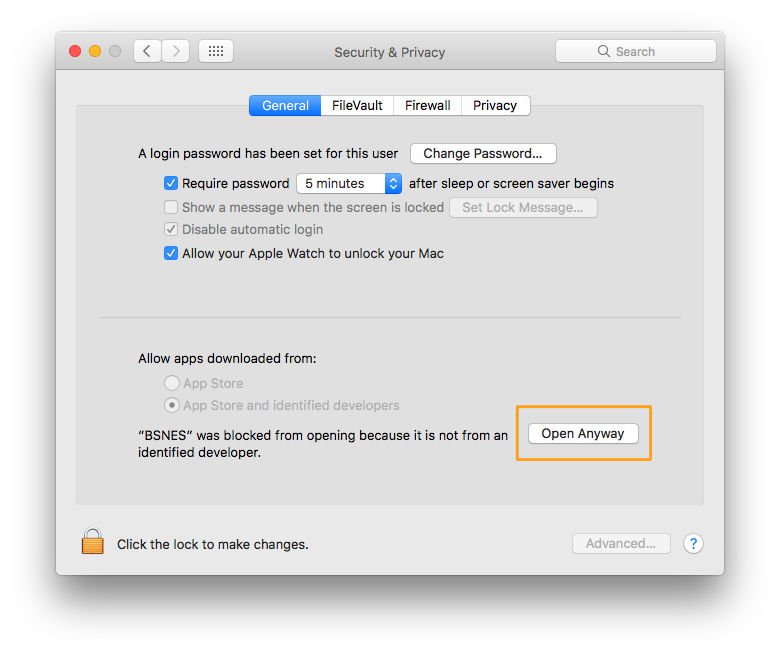
Open System Preferences and go to Security & Privacy, and make sure the General tab is selected. (You"ll see that this is the same page where you tell macOS to allow apps from identified developers as well as from the App Store.)

How to open a Mac app from an unidentified developer: Open Anyway button

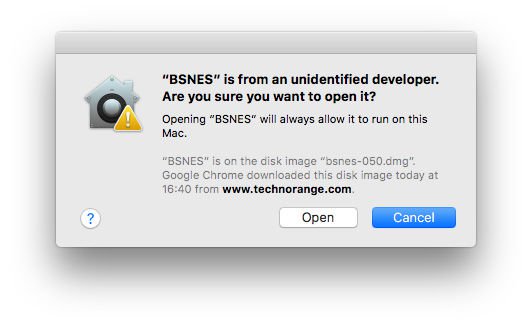
If you"ve been blocked from opening an app within the past hour, this page will give you the option to override this by clicking the temporary button "Open Anyway". You"ll be asked one more time if you"re sure, but clicking Open will run the app.

How to open a Mac app from an unidentified developer

This creates an exception for that app, so you"ll also be able to open it in the future without having to repeat this process.

Use a shortcut


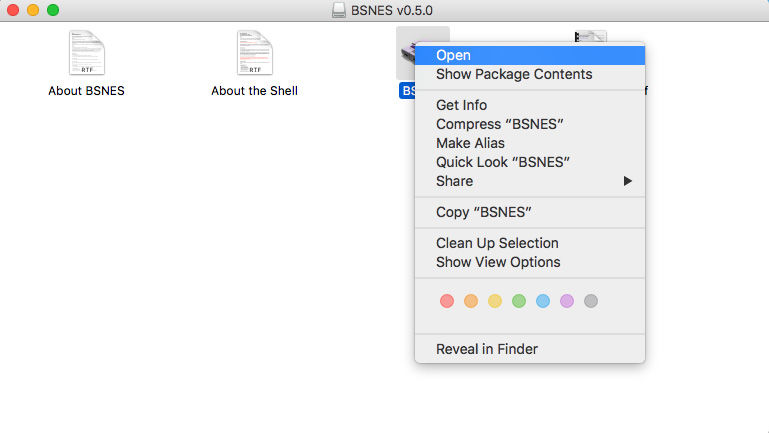
A quicker way of doing this can be to locate the app file in Finder and Ctrl-Click it. If you select Open from the resultant menu, the app will be opened anyway, and an exception will be created for opening it normally (i.e. by double-clicking) in future.

How to open a Mac app from an unidentified developer: Shortcut

Is it safe to open unidentified apps?


It might be, it might not. The point is that you don"t have Apple"s certification that it is, so you will have to rely on your own due diligence to ensure that the software is okay.

Before installing the software you should search for reviews of the app, information about the company (and distribution site/platform), and advice and testimonials from other users. Bear in mind as ever that dodgy companies are not above planting a few fake reviews to give themselves the sheen of legitimacy, so keep searching after the first few results. If you"re not satisfied, it may be safer to find an alternative that macOS is happier to install.

When installing unidentified apps you should also make extra-sure that your AV software is up to date.

Note that getting the "unidentified developer" warning dialog doesn"t mean you"re about to install some malware. As Apple acknowledges, there are plenty of reasons why a perfectly legitimate company might not be on the identified list; it might for instance just be older than the company"s developer registration programme.

Monday, 8 January 2018

New Open Source Mobile OS Puts Privacy Front and Center

A renowned Linux innovator has developed a new mobile operating system, called "Project eelo," in an effort to provide a level of data privacy that traditional Android and iOS devices fail to offer.


The new eelo system will allow mobile phone users to regain control over their personal information at a price they can afford, said Gael Duval, who created Mandrake Linux back in 1998.

Apple has become too expensive, too boring and is "going crazy with its products," he said, while Google has "become too big" and is capturing too much information about what we do.

"They want to know us as much as possible to sell advertising," Duval wrote in a post introducing eelo"s Kickstarter campaign, which has more than doubled its goal with 14 days remaining.


"People are free to do what they want," Duval wrote. "They can choose to be voluntary slaves. "But I do not want this situation for me anymore."

After deciding to leave Google and Apple for eelo, Duval received more than 6,000 reads from a couple of articles he posted detailing his plans, he told LinuxInsider.

The eelo project on Kickstarter reached more than 200 percent of goal after only 15 days.

More than 2,000 people have registered at
eelo.io since December 20 in response to his posted updates, Duval added.

eelo"s Lineage


The new eelo project is a fork of the LineageOS, which is an open source system that runs mainstream Android applications. Open source modules are layered on top of that, which help create a consistent mobile and Web system, Duval said.

The project, which calls for the developers to sell preloaded eelo smartphones and provide some premium services, will run as a nonprofit. As a community project, it will welcome contributors.

The developers will release privacy-enabled smartphone ROMs, as well as smartphones for ordinary users, with associated Web services.

They have been testing custom builds of LineageOS/eelo on the LeEcho Le2 -- a 5.5-inch smartphone with a 1080 x 1920 pixel screen, 3G RAM, 32 GB storage, a finger sensor on the back and a 4K camera -- for about Pounds130, and on a Xiaomi Mi5S.

The developers plan to have downloadable ROMs for a range of devices by 2018, Duval said, as well as a limited number of post-market Flashed devices. He also plans to discuss partnerships with Fairphone, Essential phone or similar devices, and plans to industrialize the phone by 2019.

Privacy Tradeoffs


Many consumers have expressed a desire for greater control over their experience with mobile devices, but there has to be a balance between the value proposition and customers" willingness to share on a personal level.

"Information is currency, and people are going to want more control over who has information on their behaviors and habits on a mobile device," said Ryan Spanier, director of research at
Kudelski Security.

"Eelo is focused on maintaining privacy," he told LinuxInsider, "preventing tracking and monetization of your actions without your consent."

There is growing consumer interest in a potentially less-intrusive operating system for mobile devices, but the task of establishing one in the market is daunting, said independent analyst Jeff Kagan.

Though there have been some prior efforts, no alternative mobile OS has been able to compete with iOS and Android, he told LinuxInsider.

Even if privacy is a concern, the majority of consumers don"t understand the relationship between privacy and the mechanics of their personal technology well enough to persuade them to make the shift to eelo, suggested Paul Teich, principal analyst at Tirias Research.

"Success will be made on social media stickiness and whether enough consumers or organizations think they can get "more privacy" -- whatever that means to them -- than stock Google Android or Apple iOS products," he told LinuxInsider.

Developing leading products like the iPhone and other devices involves the willingness to make tradeoffs, noted Gartner analyst Tuong Nguyen.

Companies must invest substantial resources to make their products appeal to the specific needs of their customers, he told LinuxInsider.

"Google spends a lot of time and effort to make [products] easy to use," Nguyen said, "to keep you within their ecosystem."

Saturday, 30 December 2017

Apple to open source its first graphical OS from the Lisa

Apple had a number of massive hits in the early 80s as the personal computer revolution was picking up steam. However, the Apple Lisa was not one of them. This computer was an undeniable flop, but it’s an important part of technology history.

It was one of the first systems to run a graphical user interface (GUI), and included much more advanced hardware than competing systems. You may soon be able to relive the age of Lisa now that the source code has been recovered. Apple is checking over the code and could give the green light to release it in a few months.

The code was recovered thanks to the diligence of the Computer History Museum. The museum’s software curator Al Kossow announced the find on a Lisa mailing list a few days ago. According to Kossow, the code has been handed off to Apple, which is reviewing it in advance of release. Considering the age of the software, there’s not likely to be any sensitive information in there.

It’s not often a computer that performed so poorly in the marketplace has such historic significance, but the Lisa came at an unusual time. Apple was still riding high on the success of the Apple II series, but more competitors were appearing every quarter. Co-founder Steve Jobs was famously excited by the demos of a GUI he saw at Xerox in the late 1970s, and the Lisa was the first machine to leverage that technology.

It even had a mouse! Apple spent upward of $50 million developing the first Lisa, which hit the market with a starting price of $9,995 in 1983. Apple only sold about 100,000 units of the Lisa, but the lessons learned from Lisa led Apple to develop the very successful Macintosh a year later. Despite predating the original Macintosh, the Lisa was significantly more powerful, with support for up to 2MB of RAM (the Mac topped out at 512KB and initially shipped with just 128KB). While the Mac’s CPU is clocked nominally faster, at 7.8MHz instead of 5MHz, the 6800K CPU and video controller can’t simultaneously communicate with system RAM. This reduced the Mac’s overall performance relative to its earlier and vastly more expensive counterpart.


Even the name “Lisa” comes with a lot of historic baggage. At the time, Apple said the name was an acronym for Local Integrated System Architecture. However, many suspected the name was a reference to Jobs’ first daughter Lisa Nicole Brennan, who he denied fathering for years. In his later years, Jobs admitted the computer was named after his daughter.

Fans of classic computing should keep an eye on the Computer History Museum’s website for the Lisa source code, as well as information about the historic importance of the Lisa. According to Kossow, the only thing included in the code dump that likely won’t make it into the final release is part of the LisaWrite word processor. That application shipped with an embedded version of the American Heritage dictionary for the spell checker. Apple doesn’t own that, so it can’t unilaterally choose to release it.

Monday, 25 December 2017

New Open Source Tools Test for VPN Leaks

ExpressVPN on Tuesday launched a suite of open source tools that let users test for vulnerabilities that can compromise privacy and security in virtual private networks.
Released under an open source MIT License, they are the first-ever public tools to allow automated testing for leaks on VPNs, the company said. The tools are written primarily in Python, and
available for download on Github.

Originally used to conduct automated regression testing on ExpressVPN"s own software, the tools allow users to check VPNs that might not be providing complete protection to users, said Harold Li, vice president at ExpressVPN.

"We believe the VPN industry as a whole has a duty to properly protect users who place their trust in our products," he told LinuxInsider. "We"re open-sourcing these tools as part of an initiative to encourage the entire VPN industry to join us in investing in and identifying and addressing leaks."

Leaky Gut


One-third of the participants in a November study Propeller Insights conducted for ExpressVPN cited cybersecurity as a reason to use a VPN, particularly to protect against cybersnooping over WiFi connections. About 25 percent cited the use of VPNs to make sure their ISP did not see their cyberactivity, while 15 percent said they used VPNs to protect against government surveillance.

The VPN testing tools can detect a wide range of potential leaks, the company said, including the exposure of an IP address during a WebRTC leak. Also, users" Web activity can be exposed when they switch from a wireless to a wired connection. Unencrypted data can leak when VPN software crashes or cannot reach its server.

ExpressVPN claims to be one the largest consumer virtual private networks in the world, providing one of the largest platforms for a variety of operating systems, including Windows, iOS, Android, Linux and others.

The company offers extensions for a variety of browsers, including Chrome, Firefox and Safari. It supports VPN configurations for a variety of gaming consoles, including Xbox and PlayStation, as well as streaming video platforms such as Amazon"s Fire TV, Apple TV and others.

Trust but Verify


VPNs allow users to use private networks rather than untrusted public networks, but they still can leave them vulnerable in certain situations, said Andrew Howard, chief technology officer at Kudelski Security.

"They cannot protect data once it leaves the VPN, and administrators should not assume that a VPN connection to their network is safe, even if properly authenticated," he told LinuxInsider.

There are opportunities for data leakage when setting up or tearing down VPNs, and leaks can happen during connection drops or software crashes, Howard said.

VPNs can help mitigate the probability of successful attacks leveraging any Wifi vulnerability, including man-in-the-middle attacks, said Leigh Ann Galloway, cybersecurity resilience lead at Positive Technologies.

"VPN technology itself is quite well thought out from the point of information security, but the specific implementations might have flaws, just like any software," she told LinuxInsider.

Vulnerabilities have been found in implementations like OpenVPN, Galloway noted.

In terms of data transfer, there can be leaks during implementation, she added. Leaks also might be attributable to certain software settings or applied encryption algorithms, depending upon stability, length of keys, and methods of key generation.