Showing posts with label Box. Show all posts

Sunday, 18 February 2018

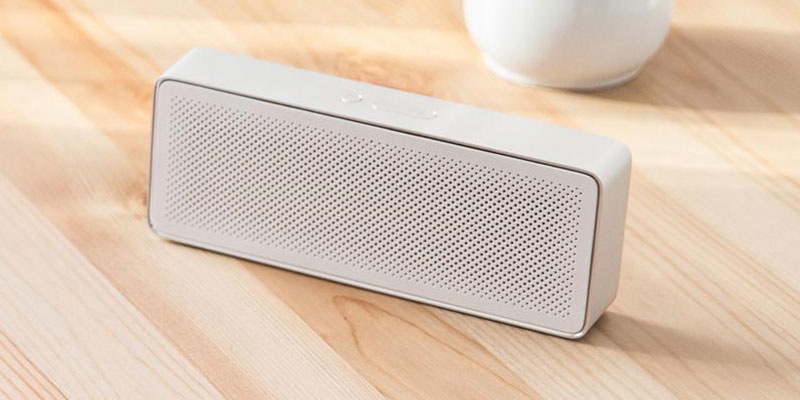
Xiaomi Mi Square Box 2 Review (10/10)

Picking a Bluetooth Speaker has now become a chore… the speaker market is saturated with new brands and the brands we know are charging overinflated prices… it feels like we only have two choices…

Take a gamble on a new brand… or pay up…

Well not anymore, as Xiaomi has just released the new Mi Square Box 2 Bluetooth Speaker. If you haven’t checked out my original Xiaomi Mi Box review, do that now and you’ll find out why I rated it as one of the best budget Bluetooth speakers available.

So what’s new on the Xiaomi Mi Square Box 2?
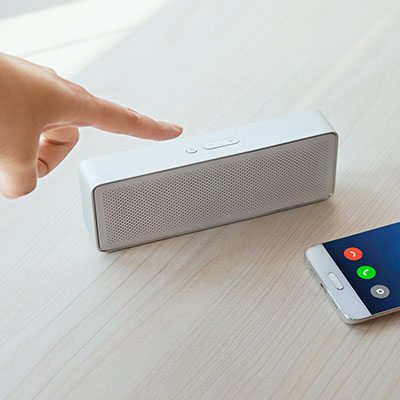
Xiaomi Mi Sqaure Box 2 Volume button

You’ll find out this and more as we take a first look at the Mi Square Box 2 speaker’s Design, Build Quality, Sound, Connectivity & Battery Life… right after the Pro’s & Cons…

Mi Square Box Generation 2 – available now…


The Pro’s

  • Added Headphone Jack

  • Super Lightweight

  • The Price-Tag

  • Premium Build Quality

  • Bluetooth 4.2


The Cons


  • No SD Card Slot

  • Smallish battery


Xiaomi Mi Sqaure Box 2 Build Quality

Design & Build Quality


I really like the Xiaomi Mi Square Box speaker… but the design on the Mi Square Box 2 is so much more refined…

On the surface, the two speakers seem very similar but the small subtle changes add up to make a big difference. The Micro-USB port has been moved to the back meaning you can leave it plugged in without having to see a wire sticking out the side.

They’ve also moved the power button to the top and added physical buttons for volume up & down making it much easier to use. Finally, they’ve hidden the LED light inside the speaker grill meaning you can see it more easily.

In terms of the dimensions, it’s nearly 25% longer than the original but manages to cut the weight down to 155 grams, a whopping 32% weight reduction. The thickness has also dropped but 1.5mm but this isn’t noticeable.

Overall, it’s another good (albeit similar) speaker design by Xiaomi. The Mi Square Box 2 has softer curved corners than it’s predecessor and really drops the weight making it much more portable.

The design isn’t as impressive as the Xiaomi Mi Cannon Speaker, but it’s miles ahead of the mainly plastic portable speaker competition…

Colours Available: White Only
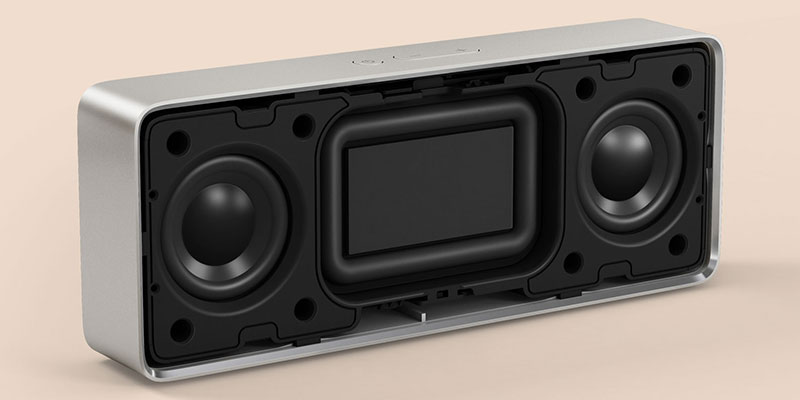
Xiaomi Mi Sqaure Box 2 Speaker quality

Sound Quality


The Mi Square Box 2 comes with the same great sound quality we found in the original. You can check out the details here. Xiaomi Mi Square Box review.

Xiaomi Mi Sqaure Box 2 Connectivity

Battery Life & Connectivity


The battery life is still between 7-10 hours thanks to the 1200mAh battery. The full 10 hours is based on using the speaker at around 40-50% volume output, so usage time will vary.

You can increase this further by using the inbuilt 1.5mm headphone jack but don’t expect miracles as the new Xiaomi Mi Square Box 2 comes with LE Bluetooth 4.2 which is already very power efficient.

Xiaomi Mi Speaker – The Verdict


It’s great to see that Xiaomi have taken onboard feedback for their second generation Mi Square Box. The Mi Square Box 2 is an improvement in almost every way.

The best of which has to be moving the micro-USB input to the back which shows off its minimalist design without a great big wire dangling out the side!

While it is 25% longer than the original, it’s also a lot lighter which is more important when measuring portability. My only suggestions would be to add an SD Card slot and to put a 2000mAh battery in at the cost of a little extra weight…

Do I recommend the Xiaomi Mi Square Box 2 Speaker? Yes, the Mi Square Box 2 features lots of subtle improvements to an already excellent speaker…

Xiaomi Mi Square Box 2 Bluetooth Speaker – Tech Specs


ModelXiaomi Mi Square Box 2 Speaker
Colours AvailableWhite Dots & Black Polygons
MaterialABS / Aluminium
InterfaceMicro-USB
Bluetooth Version4.2
Headphone JackYES
SD Card SlotNO
Wattage2.5 watts x2
Dimensions154.5 x 60 x 25.5mm
Weight155 grams
Play Time10 Hours
Battery Size1200mAh / 5 volts


Xiaomi Mi Square Box 2 Review

Sound Quality

Build Quality

Design

Battery Life

Connectivity

Value For Money


Monday, 15 January 2018

Beelink A1 TV Box review

Computers come in various shapes and forms: portable laptops, monstrous desktop or gaming PCs, and miniature HDMI dongles, or even some that are integrated into a keyboard or a wall power plug.

Where to buy?

Online Chinese retailer, Gearbest, sent us the sample and sells the Beelink A1 for just under £47 (around $64) at the time of writing. Note that, while this price includes delivery, it is exclusive of any taxes that may be levied by HMRC or the courier companies on behalf of the vendor. Want to buy tech from online Chinese retailers? Read this first.

The Beelink A1 is sold as a TV box, as the name indicates, but is just as useful – if not more – as a thin client, especially for small and medium-sized businesses that may want to move away from expensive and complicated Windows-based setups to embrace the cloud.

Design


The A1 is absolutely tiny and will comfortably sit in an adult hand. Its dimensions (76 x 76 x 17mm) mean that it can be hidden almost anywhere, but the lack of a VESA mount means that you won’t be able to fix it securely to a monitor.

The manufacturer opted for a white finish all round except for the base which is bright orange. The device’s plastic shell means that the bill of materials can be kept to a minimum while ensuring adequate heat dissipation thanks to an aluminum heatsink just under the surface.


The front is adorned with a white LED display which provides the time and system status at a glance, which can come in handy. Despite its size, the A1 manages to cram in two full-size USB ports (one of which is USB 3.0), one microSD card reader, one full-size Gigabit Ethernet port, a full-size HDMI port and an audio jack.

Spec Sheet

Here is the Beelink A1 configuration sent to TechViral Pro for review:

CPU: Rockchip RK3328

Graphics: Mali-450MP2

RAM: 4GB

Storage: 16GB

Ports: HDMI, Ethernet, microSD, USB 2.0, USB 3.0, audio jack

Connectivity: 802.11n Wi-Fi, Bluetooth 4.0

OS: Android 7.1

Size: 77 x 77 x 17mm (W x D x H)

Specifications


Bearing in mind that this is a sub-£50 box, we were surprised to find that it had 4GB of RAM (albeit DDR3), something that will definitely be helpful for future versions of Android, or if you intend to run more memory-hungry applications.

Beelink opted for a quad-core CPU – a Rockchip RK3328 – clocked at up to 1.5GHz. It supports 4K at 60Hz, H.265 and VP9 formats as well. The choice of the Mali-450MP2 remains unexplained as it is a GPU that is nearly six-years-old, and doesn’t come with architectural improvements found on later models.

The small storage capacity (16GB) is probably the only worry, although the presence of a microSD card slot mitigates our concerns – note that the thin client also sports 802.11ac Wi-Fi connectivity and Bluetooth.

As expected, the A1 is powered by a 5V2A (10W) power supply unit with a proprietary connector. We’d have preferred a microUSB affair as it would have allowed portable battery chargers to be hooked up to the device.

Thursday, 4 January 2018

Multi.js – A User-Friendly Select Box Built on Plain JavaScript

Select menus are primitive but they work. Same goes for all the typical form inputs such as checkboxes and radio buttons.

It’s easy to create your own forms but rebuilding interface elements from scratch can be tough. That’s why Multi.js is such a valuable plugin for replacing default select boxes.

With Multi.js, you give visitors a list of items to pick from with a multi-select feature built into the form. This way users can click multiple items without relying on checkboxes.

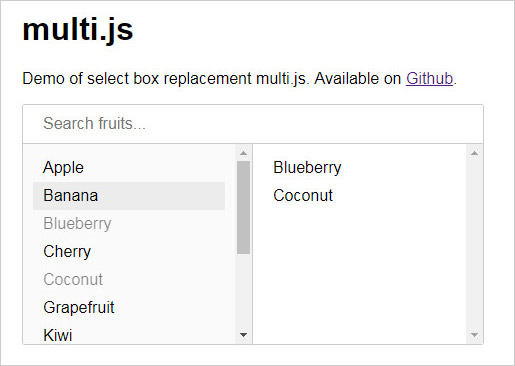
Multi.js select plugin

This script even supports a search feature, so users can search for items if the list is especially long.

I also find the menu pretty intuitive, so it doesn’t need much explaining. You click any item on the left-hand side to add it to the right column (or “selected” items). Then, click on items in the right column to remove them.

Everything runs on vanilla JavaScript, including the search feature, so you don’t need any dependencies. Although, it does support jQuery if your site uses that library.

All you need is the Multi.js file and the CSS stylesheet to go along with it. Next, you just create a <select> element and target the element with a JavaScript function, like so:
var select_element = document.getElementById( "your_element_ID" );
multi( select_element );

Right now, the plugin does not support optgroups but this feature is in the works.

Either way, the default functionality is stunning. It works just as you’d expect and it even supports mobile responsive layouts.

To learn more, check out the GitHub repo which also includes downloadable files. The Multi.js demo page is great for seeing how this plugin works in the browser. But really, it’s just a simple way to restyle your select menus while improving your form’s overall user experience.