Showing posts with label built. Show all posts

Sunday, 18 February 2018

Razer built a mechanical keyboard the size of a table

Mechanical keyboards are awesome, and they’ve had something of a renaissance in recent years as people realize their superiority to the flimsy membrane keyboards we’re used to.

But you know what’s even better than a mechanical keyboard? A really frikkin big mechanical keyboard, like the one Razer had at its CES booth.

The keyboard was fully functional, with a tactile click and realistic actuation. It even had full Chroma RGB lighting. Props to Razer for thoroughness.


Just imagine all the situations that would feel so much more satisfying with a giant keyboard the size of a small dining table:


  • Replying to infuriating commenters

  • Putting the finishing touches on your magnum opus

  • Playing QWOP

  • Manically refreshing a website.

  • CTRL+ALT+DELETE (although it would require some twister-like acrobatics)


Alas, no, you can’t buy one. It was probably prohibitively expensive just to make for the show floor. I have no idea where I’d actually put it. But I want one.

Thursday, 4 January 2018

Multi.js – A User-Friendly Select Box Built on Plain JavaScript

Select menus are primitive but they work. Same goes for all the typical form inputs such as checkboxes and radio buttons.

It’s easy to create your own forms but rebuilding interface elements from scratch can be tough. That’s why Multi.js is such a valuable plugin for replacing default select boxes.

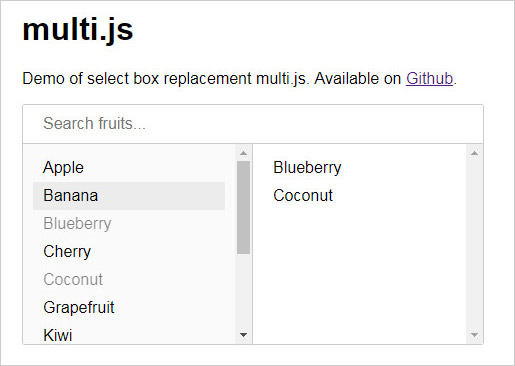
With Multi.js, you give visitors a list of items to pick from with a multi-select feature built into the form. This way users can click multiple items without relying on checkboxes.

Multi.js select plugin

This script even supports a search feature, so users can search for items if the list is especially long.

I also find the menu pretty intuitive, so it doesn’t need much explaining. You click any item on the left-hand side to add it to the right column (or “selected” items). Then, click on items in the right column to remove them.

Everything runs on vanilla JavaScript, including the search feature, so you don’t need any dependencies. Although, it does support jQuery if your site uses that library.

All you need is the Multi.js file and the CSS stylesheet to go along with it. Next, you just create a <select> element and target the element with a JavaScript function, like so:
var select_element = document.getElementById( "your_element_ID" );
multi( select_element );

Right now, the plugin does not support optgroups but this feature is in the works.

Either way, the default functionality is stunning. It works just as you’d expect and it even supports mobile responsive layouts.

To learn more, check out the GitHub repo which also includes downloadable files. The Multi.js demo page is great for seeing how this plugin works in the browser. But really, it’s just a simple way to restyle your select menus while improving your form’s overall user experience.