As impressed as we were with the Galaxy S8 and Galaxy S8+ at launch, we couldn’t help but question Samsung’s decision to put a dedicated Bixby button on the side of the phones. Bixby was meant to be Samsung’s answer to Google Assistant, but until recently, Bixby Voice wasn’t even accessible to S8 owners outside of South Korea. But now, just six months after the S8’s launch, Samsung is already walking back its Bixby plans.
On Monday, SamMobile was the first to report that Samsung had quietly begun rolling out an update to allow S8 owners to disable the Bixby button altogether. Once you install the latest Bixby updates on your S8, S8+ or Note 8, you should see a toggle at the top of the Bixby Home screen that will allow you to choose whether or not Bixby launches when you hit the Bixby button. The toggle also appears in the Bixby settings menu.
Bixby Home can still be accessed at any time by swiping left on the home screen, but at the very least, you’ll no longer accidentally go to the Bixby Home screen when you meant to turn down the volume. The fact that this appears to be such a welcome change for so many users probably isn’t a great sign for Bixby.
Interestingly, SamMobile also notes that not all S8, S8+ and Note 8 devices have received the update yet. The rollout seems to be random up to this point, so keep an eye out if you have a phone with a Bixby button.
Monday, 6 November 2017
Samsung is finally letting Galaxy S8 owners disable the Bixby button

Friday, 12 May 2017
Setting Up Fingerprint Sensor on Samsung Galaxy S8/S8 Plus
The biometric features of the Samsung Galaxy S8 / S8 Plus are almost revolutionary. These features include the iris scanning, facial recognition, and fingerprint scanning. Among these biometric security features of the phone, the fingerprint scanner is found to be the most secure feature of all.
Although there are a number of complaints about its placement and positioning, still, the fingerprint scanner is most used in the Samsung galaxy’s new flagship. So, if you are looking to set it up, here you go. We have got you covered with the guide that will describe how to set up the fingerprint sensor in Galaxy S8/S8 Plus.
How to Set Up Fingerprint Reader on Samsung Galaxy S8/S8 Plus?
Setting up fingerprint sensor on the Samsung Galaxy S8/S8 Plus is easy really easy. All you need is to have your phone in your hand and to follow the following steps:
- Reveal the “Notification Shade” by swiping down from the top of the screen.
- From there, head to the “Settings “area.
- From settings, tap “Lock screen and security”.
- There you will find an option designated as “Fingerprint scanner”
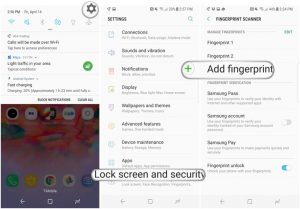
- Tap the option and you will be asked to scan your fingerprint.
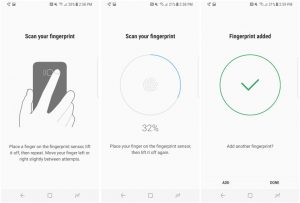
- After doing that, you are done.
Setting Up Fingerprint Sensor Gestures:
You can also set up the fingerprint gestures from the fingerprint scanner option hidden deep inside the settings. This option comes turned off by default, but you can set it up On by following the steps:
- Head to the Settings and select Advanced features.
- Toggle fingerprint sensor gestures “On”.
- And you are done!
To comment on this article and other TechViral contents, visit our Facebook page, Pinterest page, Instagram Account or our Twitter feed.