iOS 11 has a new feature that allows you to discreetly disable the Touch ID unlock functionality, requiring the PIN code for access to the device. Here’s why that’s important (and how to use the new locking feature).
The new feature on iOS 11, one of many new changes, has been called the “cop button”, because the most immediately apparent and practical use of the button is to disable Touch ID discreetly when you encounter law enforcement officers, border agents, or others who wish to access your phone. Why would this matter? Because PIN codes and passwords afford you better protection under current legislative models than biometic identification. U.S. courts have ruled that biometric identifiers like your fingerprint are not covered under Fifth Amendment protections, but codes (which must be recalled from your mind and voluntarily turned over) are. For those of you interested in the legal side of things, here’s a brief article from The Atlantic that covers the basics of it.
With the why side of things out of the way, let’s look at the very simple way you can quickly lock your phone so that only the PIN can be used to unlock it. While your iPhone, running iOS 11, is on, simply grab the phone and rapidly click the power button on the side of the phone five times.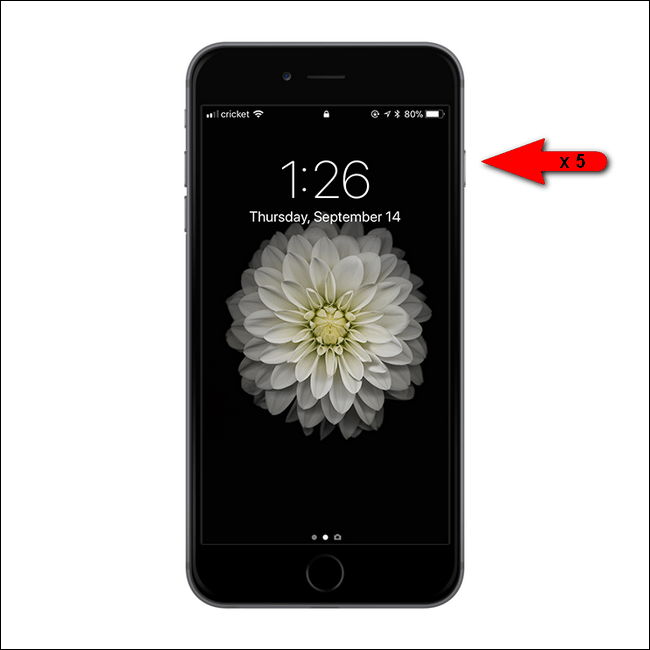
iOS will pull up the emergency calls screen but will also disable Touch ID. Touch ID will not be enabled until the phone is unlocked with a valid PIN.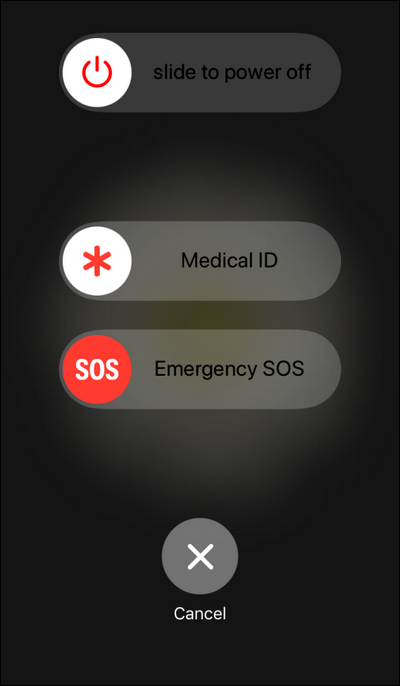
At this point Touch ID is disabled and if you phone it taken from you your fingerprint cannot be used to unlock it.
There is no need to enable any settings to take advantage of this feature (nor can you disable the feature). Although, if you’re thinking about security in this way and wish to ensure that your locked iPhone doesn’t provide any compromising information, we would recommend popping into the Passcode Lock settings, found under Settings > Passcode Lock, in order to further restrict what your phone can do while it is locked: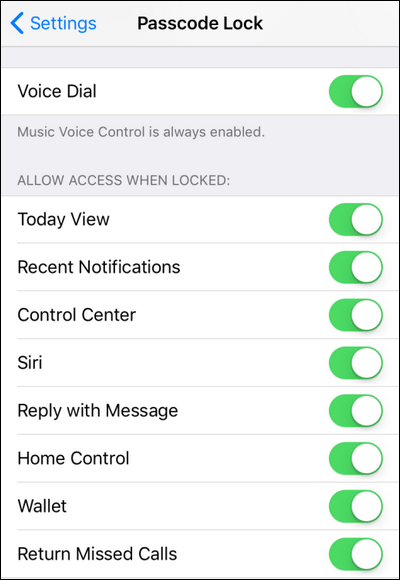
If you’re using your phone in a situation where disabling Touch ID is even a consideration, it would also be wise to toggle off the “Allow Access When Locked” settings to remove access to the message reply function and missed calls, for example.
Monday, 25 September 2017
How to Temporarily Disable Touch ID in iOS 11

Thursday, 14 September 2017
Apple’s Face ID will support only one registered face per iPhone at launch
Apple’s forthcoming Face ID technology will support just one face registered per device, at least initially. This has been reported by multiple people who spoke to Apple at this week’s iPhone event, and confirmed separately, but it’s worth noting because it could change some user behavior regarding the device.
Also Read: Face ID is replacing Touch ID on iPhone X
Face ID supporting just one face makes a lot of sense on the face of things (sorry), since unlike with Touch ID, users have only one face to use for their unlocking purposes. Touch ID ostensibly allows multiple fingers to be registered because you have quite a few digits of your own, and depending on how you’re using the device or in which pocket you keep it, one might be more convenient to use than another.
The issue is that people also often register the fingerprints of their significant others, or even kids, depending on how they use their device. The phone can store up to five fingerprints, which makes it relatively easy to keep a few of your own as well as those of a significant other on your device just in case.
A one phone, one face policy obviously won’t support that kind of arrangement: If you want to give your loved one access, you’ll need to smile for the camera, or share a backup passcode so they can get in that way. The passcode option is only marginally more inconvenient than a registered Touch ID fingerprint, of course, but it still makes a difference, especially if someone’s only very occasionally accessing your device and might not have committed a pin to muscle memory as a result.
Also Read: Top 3 features of Apple iPhone X
I think this is more of an issue if Apple ends up moving Face ID across its product line, to devices like iPads that are much more often shared gadgets. Still, depending on how your use your phone, it might be another decided factor in whether you go with iPhone 8 or iPhone X – or, of course, neither.
Wednesday, 13 September 2017
Face ID is replacing Touch ID on the new iPhone X
So to keep your phone secure Apple is introducing Face ID, which lets you unlock your phone by just looking at it. This new scanning feature also replaces Touch ID for Apple Pay and other apps that used Touch ID to authenticate users, like banking apps.
Apple just introduced the new iPhone X, and the full edge-to-edge screen means no more home button. No more home button means no more Touch ID, since that’s where Apple put the fingerprint scanner in older phones.
Here’s how it works: The new iPhone X takes a 3D scan of your face from all angles the first time you use the phone. It then saves that scan of your face inside the iPhone X’s secure enclave hardware chip, and compares it when you want to unlock your phone.

Apple uses a bevy of new hardware to capture this 3D facial map – including a dot projector, traditional front-facing camera, flood illuminator and infrared camera. It’s essentially an Xbox Kinect miniaturized and put on the front of your phone.
Apple says the facial scan is so accurate there’s now only a 1 in 1,000,000 chance of another random person’s face being able to unlock your phone. This is much better than the 1 in 50,000 error rate for Touch ID. And no, holding a photo up of someone can’t unlock their phone – nor can a Hollywood-grade face mask, which (shown below) were used by Apple’s engineering teams to train the feature.
Source: TechCrunch