Got your brand new Samsung Galaxy S8? Wondering what to do with it? Which Galaxy S8 apps to install on your phone? If so, you are at the right place. Below we have done a quick roundup of some Galaxy S8 apps that would be included on your device. These apps will definitely enhance your experience of the phone and will supplement fun in your life.
#1: Best Camera App - BestMe Selfie Camera:
If you want to get enhanced fun with the camera of Samsung Galaxy S8, BestMe Selfie Camera should be on your list. This is a free camera application and is very useful for you if you are a selfie nerd. A ton of amazing features like stickers, real-time filters, effects and adjustment settings are included in the app. After taking out class selfies and pictures, you can share them on your social accounts like Facebook, twitter, Instagram etc. with your peers and family.
#2: Best Video Player App – MX Player:
Your phone would be useless if you don’t have a good Video player app in it. Samsung Galaxy S8 offers huge AMOLED Display that you can enjoy by watching films and videos using a good video player. MX Player is one of the best video players on the Play Store that lets you enjoy HD videos with tons of additional features.
#3: Best Social Media App – Facebook:
When it comes to social media, nothing is more popular than Facebook. If you are one of the Facebook nerd, this app is much needed on your Samsung Galaxy S8. The app offers tons of features on your mobile device just like the official Facebook website. Stay connected and keep on socializing.
#4: Best Productivity App – Microsoft Suite:
A collection of all the productivity apps comes under the Microsoft Apps through which you can access offerings like Word, Excel, PowerPoint, One Drive etc. Not only this, you can also discover education, entertainment, communication and news using this app.
Have these apps on your Samsung Galaxy S8 and make it worth having! For more tech news and info, keep visiting us J
Monday, 19 June 2017
Top 4 Must Have Galaxy S8 Apps

Monday, 12 June 2017
Galaxy S8 vs S8 Plus: What"s the Difference?
With the introduction of Samsung Galaxy S8 and S8 Plus in the market, it brings confusion, simultaneously among the people – What makes them different? Which one should they buy? Is Samsung Galaxy S8 worth buying? Or they should give a shot to Samsung Galaxy S8 Plus? If you are living with the same condition, we are here to give you a clear picture of the difference between the two phones.
Check out the main differences between the two – Samsung Galaxy S8and S8 Plus and decide which one to buy!
Comparing Samsung Galaxy S8 and S8 Plus – Which One’s Worth Buying?
You might be wondering that Samsung Galaxy S8 is a regular phone and S8 Plus is just its larger version with a larger screen. This is just not the only difference between the two devices. Although the two phones’ got the similar specs, they do get some major differences. Check them out:
#1: Batteries:
The two phones have got the major difference in their batteries. The Samsung Galaxy S8 packs a battery cell of 3,000mAh while the larger phone has got a larger battery that is of 3,500mAh juice pack. As there’s a significant difference between their batteries, it will definitely influence your choice, when it comes to buying one.
#2: Screens:
You might have got many insiders about the Super AMOLED display of the siblings- S8 and S8 Plus, but their screen sizes are at the difference. The main difference of the phones lies in the sizes of the screen as Samsung Galaxy S8 has 5.8” display while the S8 Plus version has got a larger screen size of 6.2”.
So, if you are ditching your phone to get a bigger one, you should go with the S8 Plus.
#3: Prices:
Price is another major difference between the two siblings. The larger one costs with the price tag of $825, while its little sibling costs $720. So, your budget would also determine the type of your phone.
Regarding these differences, which phone would you buy? Samsung Galaxy S8 or S8 Plus? Do mention in your comments below!
3 Killer Features of iPhone That Will Make You Love It More
Android or iOS? Which one’s better? Which one to buy? Well, these are some questions that revolve around the minds of each and every person since the evolution of these two Operating systems. And even until now, the winner of the race is not confirmed.
No matter which OS be the winner, there are some killer features of iPhone, that makes it always better than the Android. So, in the following article, we are going to list some important features of iPhone, that will make you love it even more.
3 Killer Features of iPhone Making it Better than Android:
#1: Wide Color Range: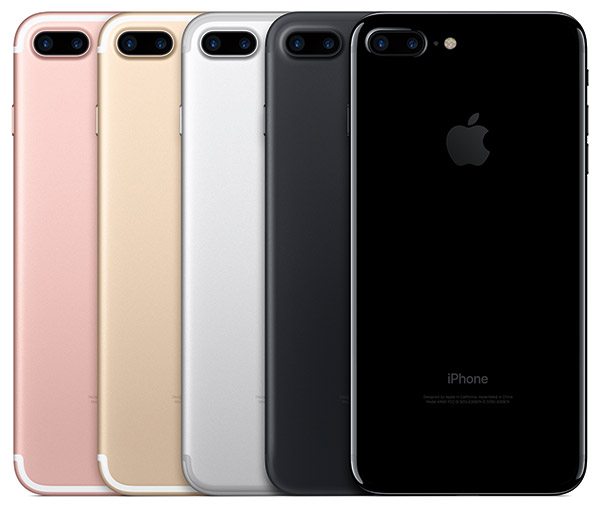
Although black, silver and white colors in phone never leave the trends, however, there are some people who want to ditch their phones just to switch the color that will go with every dress they wear. That is the reason why iPhone goes popular with its every new model in the market. Recently, the addition of the RED color in iPhone 7 gets the edge over the Android.
#2: Security: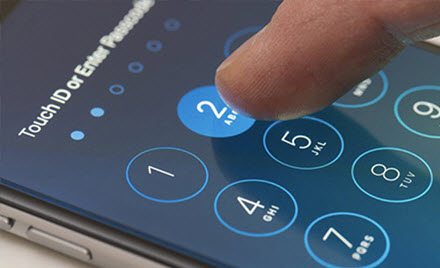
Regardless to say, iOS offers more secure features than any other Android device on the Earth. Tough Samsung has introduced many of the biometric features in its new flagship – Galaxy S8, still, iPhone has got more security features including the virus blocking without even letting the user know. Moreover, the apps available on the App Store are safe to download on iPhones, but this is not the case with Android phones, making them vulnerable.
#3: Over the Edge Performance: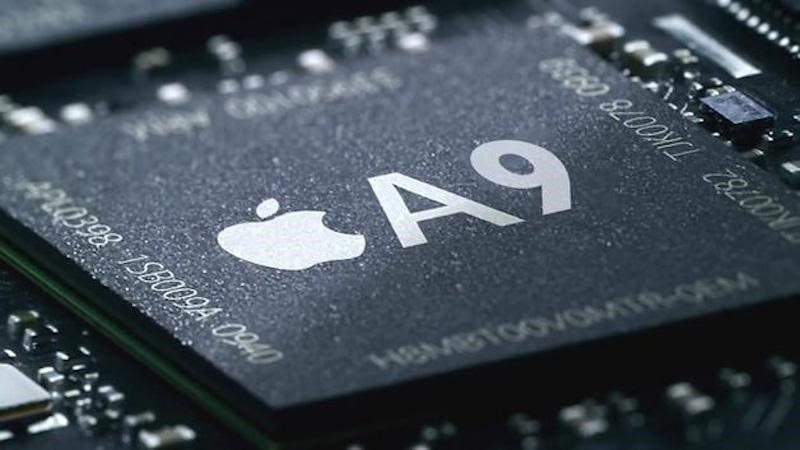
Performance is the most important feature of the iPhone, making it better than any other Android devices on the market shelves. Whether it is given by the speed tests or by personal experience, you will always find that Apple has got the smoothest performance.
Although you cannot get more choices from iPhone, still, these 3 features make them better than Android. For more tech know-how, keep visiting our Facebook page and our website!
iPhone 8: What Can We Expect?
After the release of Samsung Galaxy S8’s flagship in the market, we are expecting iPhone 8 to be released in the fall of the year 2017. This year is definitely going to be a hallmark of tech advancements as with the success of Samsung Galaxy S8, iPhone 8 is going to offer some amazing specs and features that you might be craving for.
Want to know the expected features of upcoming iPhone 8? Settle down with your popcorns and enjoy what the new Apple’s flagship would look like.
iPhone 8 Features At a Glance:
Apple has a major redesigned phone upcoming this year. This is not what I am saying, it is what expected from the news and sources. With the glass body, edge- to- edge OLED display, this phone is definitely going to be a breakthrough in technology. Here are some expected features that will be packed in compact iPhone 8:
- A11 Processor with improved and smoothest performance
- 8” OLED Display with bright contrast and vibrant color ratio
- Glass Body for sleek look
- Camera and Touch ID integrated into display
- Ditched Home Button
- Wireless Charging technology for faster charging
- Edge-to -Edge Display
- Vertical Rear Camera
Besides this, the iPhone 8s is going to come with the amazing biometric features, dual rear cameras, 3D touch, Apple Siri and much more. These are all expected features and not at all confirmed by the Apple, Inc. company. But if these features are confirmed for the next Apple’s flagship, it is definitely going to be worth trying.
For more information and news about the iPhone 8, keep visiting our website and Facebook page.
Tuesday, 6 June 2017
How to Fix the 3D Touch Problems in iPhone 7?
Struggling with the 3D touch of your iPhone 7 or 7Plus? Do you feel it difficult to perform your function using the iPhone 7? If so, you are at the right place. The addition of the 3D touch in the Apple smartphones is great, but it has been provided that this 3D touch feature is vulnerable and do not work properly. Many users claimed that they have to press hard, in order to complete their respective function using the 3D touch of the iPhone 7.
If you are the one facing a hard time with the 3D touch, here’s how to configure it.
Configuring 3D Touch in iOS 10:
Configuring 3D touch in iOS is a simple process that involves a really quick change to the 3D touch settings in iOS’s settings menu. Here’s how it is done:
- Reach the Settings application your phone and then reach the “General Settings” option.
- Navigate through until you find an option saying “Accessibility” and give this option a tap.
- Part down the accessibility options, there you would see another option called “3D touch”. You can tap the slider button in order to enable or disable it.
- You can also adjust the sensitivity of the 3D touch as well from the bar there. You can choose between the “Light”, “Medium” and “Firm”. If your 3D touch isn’t working and giving you a hard time, try bringing back it to “Light”.
- There’s a testing image beneath the sensitivity bar from which you can test your new settings. Give it a long press and you are ready to go.

Try this simple method out and let us know how this worked for you, in the comments section below!
For more information about iPhone, keep visiting our Facebook page, Pinterest page, Instagram Account and our Twitter feed.
Sunday, 4 June 2017
How to improve the battery life of Samsung Galaxy S8?
With almost all the futuristic features, Samsung Galaxy S8 is probably the best smartphone of the year. Although the new flagship from the South Korean giant houses a number of amazing features, unfortunately, the battery is not the thing at which Samsung’s new flagship is good at.
Features like Always-On-Display and ultra-High-Definition resolution of the Samsung Galaxy S8 cannot be handled by its battery and that is the reason why we have got many users of the phone complaining about its battery life. So, if you are one of the users of Samsung Galaxy S8 and want to improve its battery life to save it for a longer run, here’s what you can do:
3 Simple Ways to Improve Battery Life of Samsung Galaxy S8:
Without getting your interest away, here are some simple and easiest ways to extend the battery life of your new Samsung Galaxy S8/S8 Plus.
#1: Reduce the Screen Brightness: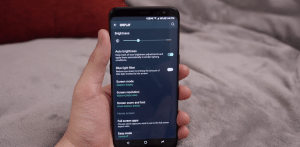
Although we all like that brightened up the screen with lots of color contrasts and combinations, but, if you are up to saving your battery of your phone, you have to reduce its screen brightness. As a matter of fact, the phone has to work hard to show you things with full brightness and that is the reason, it will kill all your battery. You can adjust the brightness of your phone only when you are running out of the battery to save it. Here’s how you can do it:
How to Reduce Screen Brightness:
Just drag down the notification panel of your phone and use the sliding bar to adjust the brightness of the screen in order to save battery life.
#2: Enable the Power Saving Mode: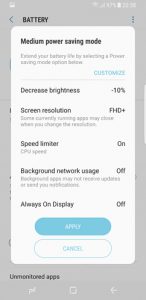
In order to save the battery of your phone for the longer run, Samsung has offered two different power saving modes for its users in Galaxy S8. The MAX and MID modes are used to improve the battery life of the phone.
How to Enable the Power Saving Modes:
Head towards the “Settings menu” and then “Device Maintenance” and “Battery setting” in your Samsung Galaxy S8. Under the battery settings, you will find the “MAX and MID” modes. Select the mode that you want to enable and then hit apply changes button.
#3: Disable Connectivity Features: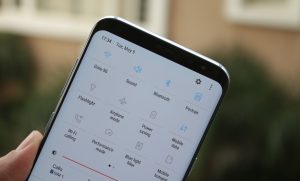
When you are running low on battery, you can disable the connectivity features like Wi-Fi, Bluetooth or GPS to save your battery life. These connectivity features are the most battery killing things that you need to avoid to save yourself a battery of up to 30 percent.
Use these simple yet effective ways to save your battery and do let us know if these methods worked for you in the comments section below!
Friday, 2 June 2017
The Issues with Samsung Galaxy S8
Although Samsung Galaxy S8 is one of the best smartphones of the year but still, there are some issues that has crept up its users. Most of the users of the Samsung Galaxy S8 are really happy with its futuristic features including the biometric features, Always –On –Display, AMOLED screen, and amazing camera.
But at the same time, there are some users who complained about the actual issues with the Samsung Galaxy S8.
These issues include the software problems as well as the hardware problems. So here’s a list of downsides of the Samsung Galaxy S8 that you should check before buying one for you.
The Negatives of Samsung Galaxy S8:
After going through the reports from the analysts and complaints from its current users, here are some issues that the Samsung Galaxy S8 has actually got:
#1: Odd Placement of Fingerprint Scanner:
Although Samsung has got the futuristic feature of a fingerprint scanner, but its placement has really got odd. It is present just by the side of the camera that is too high to reach up there. This fingerprint scanner is really of use, but if it was placed in the right place, it would be the plus for the Samsung. But to the dismay, they have actually screwed it up.
#2: Face Recognition can be tricked by the Picture:
You might have heard of Samsung boasting its amazing biometric security features. But contrary to the claims of the company, even before the launch of the Galaxy S8 in the market, a blogger proved that its facial recognition feature is not that secure as Samsung purports. He showed that this feature can easily be tricked using a photo of the owner, making the face recognition feature vulnerable.
#3: No Major Improvements in the Camera:
Samsung claimed that the camera of Samsung Galaxy S8 is redefined, but it is not that improved as expected. The camera of this year’s flagship has borrowed the same pixels from its predecessor and that is the reason it does not fit the claims of the company and the requirements of the selfie nerds.
For more information regarding the Samsung Galaxy S8, keep visiting our Facebook page, Pinterest page, Instagram Account and our Twitter feed.