Showing posts with label Google. Show all posts

Sunday, 18 February 2018

Intel, Microsoft, Google Scramble for Solutions as Patches Slow Systems

Major tech companies, including Intel, Microsoft and Google, scrambled to calm the mood this week after a large number of computer users reported performance problems linked to security updates for the Spectre and Meltdown vulnerabilities.

A firestorm of criticism has erupted over the response to the chip flaws, which researchers at Google"s Project Zero discovered in 2016. Months passed before the problems were disclosed to the public. Further, the security patches released in recent days have been blamed for performance problems, including slowdowns in many systems. The fixes reportedly rendered a smaller number of systems unbootable.

Intel CEO Brian Krzanich on Thursday sent an open letter to the technology industry, pledging the company would make frequent updates and be more transparent about the process, and that it would report security issues to the public in a prompt manner.

Design Flaw


Intel Executive Vice President Navin Shenoy on Wednesday issued an update on the impact of the patches on performance, saying that eighth-generation Kaby Lake and Coffee Lake platforms would see less than a 6 percent performance decrease. However, users running Web applications with complex Javascript operations might see a 10 percent reduction.

The seventh-generation Kaby Lake platforms would experience a 7 percent reduction, and the impact on the sixth-generation Skylake platforms would be slightly higher at 8 percent.

Intel released numerous statements after the vulnerabilities were made public, and it shot down reports that its chips were the only ones at risk.

However, the Rosen Law Firm on Wednesday announced that it had filed a class action suit against Intel, alleging a failure to disclose the design flaw. The complaint cited reports that Intel had been warned of the problem. An Intel spokesperson was not immediately available to comment for this story.

Project Zero researchers discovered serious security flaws caused by "speculative execution," a technique used by modern CPUs to optimize performance, Matt Linton, senior security engineer at Google Cloud, and Matthew O"Connor, office of the CTO, wrote in an online post.

G Suite and Google Cloud platforms have been updated to protect against known attacks, the company said, though it acknowledged concerns that a variant of Spectre is considered more difficult to defend against.

Microsoft and others in the industry were notified of the issue several months ago under a nondisclosure agreement, Terry Myerson, executive vice president of Microsoft"s Windows and Devices group, noted earlier this week in an online post. The company immediately began engineering work on updates to mitigate the risk.

The flaw could allow a nonprivileged user to access passwords or secret keys on a computer or a multitenant cloud server, explained Stratechery analyst Ben Thompson in a post Myerson referenced.

Contrary to Intel"s protests, the potential risk from Meltdown is due to a design flaw, Thompson also noted.

Users of Windows 8 or Windows 7 systems using Haswell or older CPUs and would see a decrease in system performance after patching the flaw, Myerson noted.

Apple released updates for iOS, macOS High Sierra, and Safari on Sierra and El Capitan, noting the issue relates to all modern processors and affects nearly all computers and operating systems.

However there have been no reported compromises of customer data, Apple added, and Apple Watch is not affected by Meltdown or Spectre.

Performance Over Prudence


"The Meltdown and Spectre vulnerabilities require adjustment to critical, low-level interfaces in affected operating systems," said Mark Nunnikhoven, vice president of cloud security at Trend Micro.

"Given the scale of the issue, the patches by Microsoft, Apple, Google and others have been very successful," he told TechNewsWorld.

Still, there have been problems in some cases, Nunnikhoven said, noting that Microsoft and AMD have been pointing fingers at one another following reports of computers slowing down or in some cases not booting.

Microsoft has suspended automatic updates and is working with AMD on a solution, it said in a security bulletin.

Like most organizations, chip manufacturers long have prioritized speed over security," said Ryan Kalember, senior vice president of cybersecurity strategy at
Proofpoint, "and that has led to a tremendous amount of sensitive data being placed at risk of unauthorized access via Meltdown and Spectre.

The software patch required to fix Meltdown can slow computer processors down by as much as 30 percent, said Alton Kizziah, vice president of global managed services at
Kudelski Security.

"Organizations need to test patches before installing them to make sure that systems that may already be pushed to their limits won"t crash and cease functioning as a result of the patch," he told. Also, those using Microsoft patches may need to make adjustments to their registry keys to avoid interference with antivirus software.

Saturday, 3 February 2018

Anker Zolo Model Zero Google Assistant speaker has an odd design

If you thought Anker was done flooding CES with all sorts of devices, whether they were directly related to its core charging business, better think again. It still has one last hurrah to give and it’s a head-turner. Its ZOLO smart audio brand has announced a new smart speaker with a very unique design that you’ll want to show off in your home. Inside the Zolo Model Zero, however, lies not just power but also intelligence, thanks to Google Assistant at your bekc and call.

The Model Zero eschews the design that has become common among smart speakers, which is either cylindrical or the traditional box. In fact, it throws away all common speaker designs. Zolo calls it “audio artistry” and it’s what you get when you take a designer fashion handbag and turn it into a solid, hefty, and deadly weapon. In fact, it’s supposed to be as portable as a handbag, too. Sort of.


Despite not having a 360-degree design, Zolo claims that the radial shape of the Model Zero still has optimal angles to deliver sound to the farthest reaches of the room. Utilizing Dolby Audio technology, the Model Zero promises crystal-clear audio in a compact, if you can call it that, package.

But the speaker is a smart speaker as well, and it takes its smarts from Google Assistant. You will be able to not only ask it about the weather but even play online music. If that isn’t enough, it also comes with Chromecast built-in so you can stream from your mobile device as well.

The Zolo Model Zero speaker is definitely one of the odder smart speakers to come to the market, designed to appeal to more fashion-oriented consumers. No price has been given yet but the speaker is set to launch in Fall this year.

How to Change Language in Google

How do you change the language across all your Google services? The answer isn’t as apparent as you might think.

Sure, changing the language in Chrome is quite straightforward, but that won’t affect the language you see on YouTube, Keep, Drive, or any of Google’s other productivity apps.

If you created your Google Account while living as an expat in a foreign land and you can’t understand a thing, or you’re trying to immerse yourself in a new language in a bid to aid the learning process, keep reading. In this brief article, we explain how to change the language in Google.

How to Change Language in Google google change language 670x449

How to Change Language in Google


To change the language in Google, you just need to follow the step-by-step instructions below:

  1. Navigate to myaccount.google.com.

  2. Enter your Google Account credentials and click Sign In.

  3. On the Google Account home screen, select Account Preferences.

  4. In the panel on the left-hand side of the screen, scroll down to Language and Input Tools and click on the link.

  5. Click on Language.

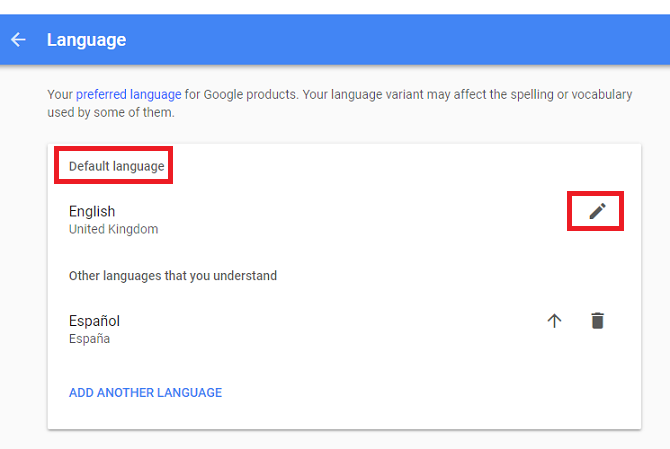
  6. Firstly, set your Default Language. Click on the pencil icon to see the available options, then highlight a language and choose Select to make your choice.

  7. Next, set up Other languages that you understand. If some content is naturally in that language, Google will not convert it to your Default Language.

  8. You can add multiple extra languages by clicking Add Another Language.


All Google’s services should now be shown in the newly selected language. You might need to log out of Google then log back in for the changes to take effect.

Have you changed the default Google language? What made you make the alteration? You can share your stories and ask any questions ion the comments below.

Image Credit: Pe3k via Shutterstock

Thursday, 25 January 2018

You Can Now Buy Audiobooks on Google Play

Google has started selling audiobooks on the Google Play Store. Google is keeping things simple, offering a range of audiobooks at reasonable prices. All of which are one-off purchases, with no need to take out a subscription. In other words, Amazon suddenly has some serious competition.

Audiobooks are becoming increasingly popular these days, probably because the hectic lives we lead leave little time to actually sit down and read a book. You can listen to audiobooks while you’re doing other things, which makes them the perfect medium for busy people.

Buy Audiobooks on the Google Play Store


Starting today, Google has added audiobooks to the Google Play Store. Audiobooks are initially available in 45 countries and nine languages, and they can be enjoyed on Android, iOS, the web, and devices powered by Google Assistant, which includes the Google Home smart speaker.

Audiobooks have their own section on Google Play, and Google pulls no punches by headlining it, “Listen without a subscription”. This is an obvious dig at Amazon, which is pushing Audible subscriptions hard. While you can buy individual audiobooks on Amazon, they can be pricey.

https://twitter.com/Google/status/955857956159021056

Google is offering single audiobooks at what it calls “an affordable price”. You can preview books to make sure they’re going to be your bag, and share them with everyone in your family using Family Library. You can also start listening on one device before switching to another.

The biggest boon is the integration with Google Assistant. This means you can say, “OK Google, read my book,” and it will start playing on your phone or smart speaker. You can even set a timer for bedtime by saying, “OK Google, stop playing in 20 minutes,” allowing you time to fall asleep.

Competition Is Almost Always a Good Thing


Competition is almost always a good thing, as it tends to bring prices down. Which is reason enough to welcome Google to the audiobooks business. But it also helps that Google has made the business of buying audiobooks on Google Play and listening to them on your devices so easy.

Are you a fan of audiobooks? What was the last one you listened to? Do you have an Audible subscription? Or do you source your audiobooks from elsewhere? Can you see yourself buying audiobooks from Google Play in future? Please let us know in the comments below!

Monday, 15 January 2018

Google keeps losing its bikes to local thieves

Over the last ten years, Google has had a fleet of hundreds of free bicycles for employees at its Mountain View headquarters, offering a quick and easy way to get around the constantly expanding corporate campus. With roughly 1,100 of these “Gbikes” now available, Google’s latest problem is that it can’t keep local residents from riding off with them.

Google admits that it seems to be losing 100 to 250 of its multi-colored bikes every week, and has begun to develop solutions to get them back. The real source of the problem isn’t so much thieves with malicious intent, rather it’s local Mountain View residents who have begun to see the Gbikes as a free community service. The bikes are said to often end up at places like schools, taverns, and in one case, the Burning Man event in Nevada.

However, there are some residents that see taking the bikes as kind of revenge for Google essentially taking over their town. According to the Wall Street Journal, one man has a garage full of “borrowed” bikes, while another women uses them as a form of protest against the Google Buses, which transport employees to work from the San Francisco Bay area.

To help reduce its losses, Google has hired a team of 30 contractors with five vans who have the sole job of recovering the lost and stolen bikes from around the city. The company has also began testing GPS trackers on about a third of its Gbikes, and is considering locks that can only be opened with a Google employee’s phone.

Sunday, 7 January 2018

Apple Photos vs Google Photos: Cost, privacy, security and ease of use

Google Photos is an app where you can back up and browse your entire photo library from almost any device. Many people have drawn similarities between Google"s Photos app and Apple"s Photos app, which was introduced in iOS 7 and subsequently arrived on the Mac, so we"re going to compare the two and see exactly how similar they are, and which is the best for you.

Google Photos is a free download for iOS so you can run it on your iPhone or iPad - it"s not just for Android users.

For some related comparisons between Apple and Google products, take a look at Apple Maps vs Google Maps and Apple Music vs Google Play.

Organisation and search


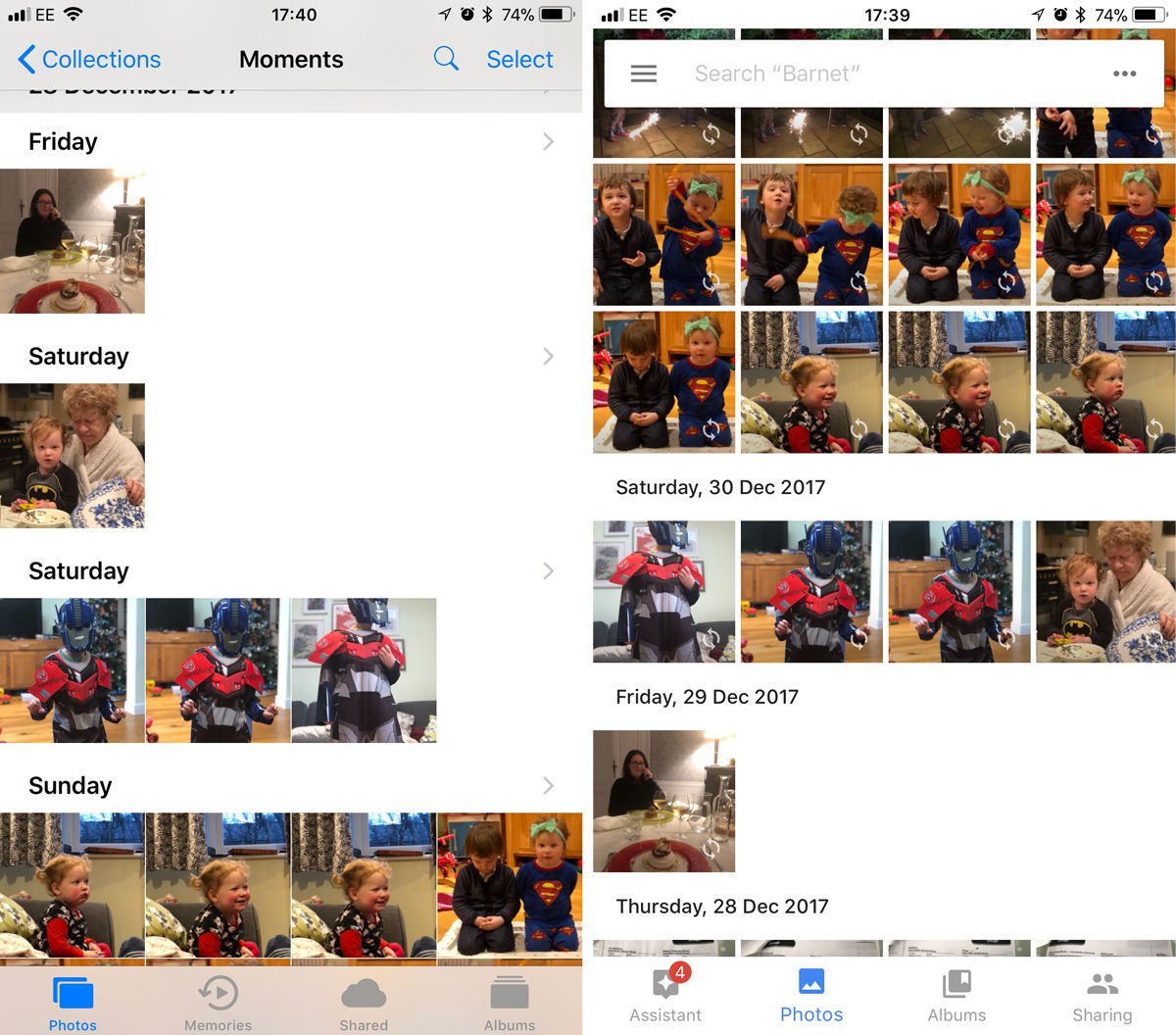
The way that both the Apple Photos and Google Photos apps organise your photos is very similar. Apple organises your photo library using smart groups based on time and location called "Moments", "Collections" and "Years".

Moments are groups of photos all taken over the course of a day (occasionally you"ll see a day split into two Moments). Collections are photos taken over a number of days or weeks: you"ll see a selection of photos taken around the same time, with some location data if you"ve got location services turned on. Years are an overview of photos taken over the course of the year (obviously).

Tapping at a point on the Year view will take you to the Collection of photos from around that time, tap again to be taken to the Moment, which will be all the photos from that particular occasion.

On Apple"s app you can also sort your photos into Albums, or tag a photo with a heart to automatically add it to your Favorites Album.
Apple Photos vs Google Photos: Organisation & interface

While the two apps may look somewhat similar, Google Photos takes a different approach to photo organisation. The order is reversed, for one thing: the most recent photos appear at the top and you swipe up to see more.

If you"re viewing the day"s photos in Google and want to see all the photos you took in a month, pinch to zoom out. Want to zoom in on a particular photo? Unpinch to zoom into it. If you zoom out from a photo back to the day, or month view, a side bar appears that lets you quickly scroll back in time by tapping, holding and dragging the side bar to a specific month. This side bar is slightly more precise than swiping up and down on the Apple app.

Search


However, that"s not the impressive part of Google Photos organisation - it automatically analyses your photos and adds them to categories such as "Cats" or "Skylines" that you can quickly access.

It doesn"t stop there, either, as you"re also able to keyword search to find a photo. For example, if we want to view all photos containing phones, type "gadgets" into the search bar and Google Photos should display every photo in your library that has a gadget in it. It"s not 100 percent accurate yet, but we"re surprised (and a little creeped out) by how well it works.

The Google app also sorted all our photos of cats into a folder for us: we didn"t even have to ask.

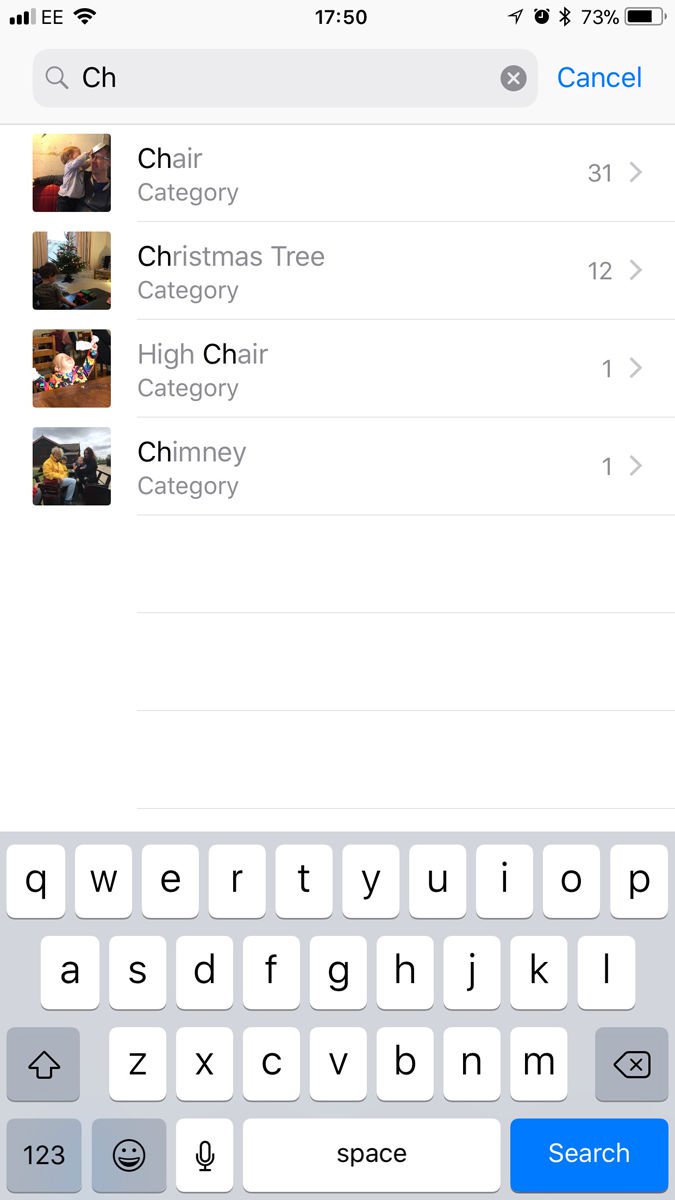
Apple also has a search feature within its Photos app, and this works well. Since launch this has evolved; it used to be limited to locations and dates, but now you can search for things as diverse as chairs, chimneys and Christmas trees.
Apple Photos vs Google Photos: Search

Editing


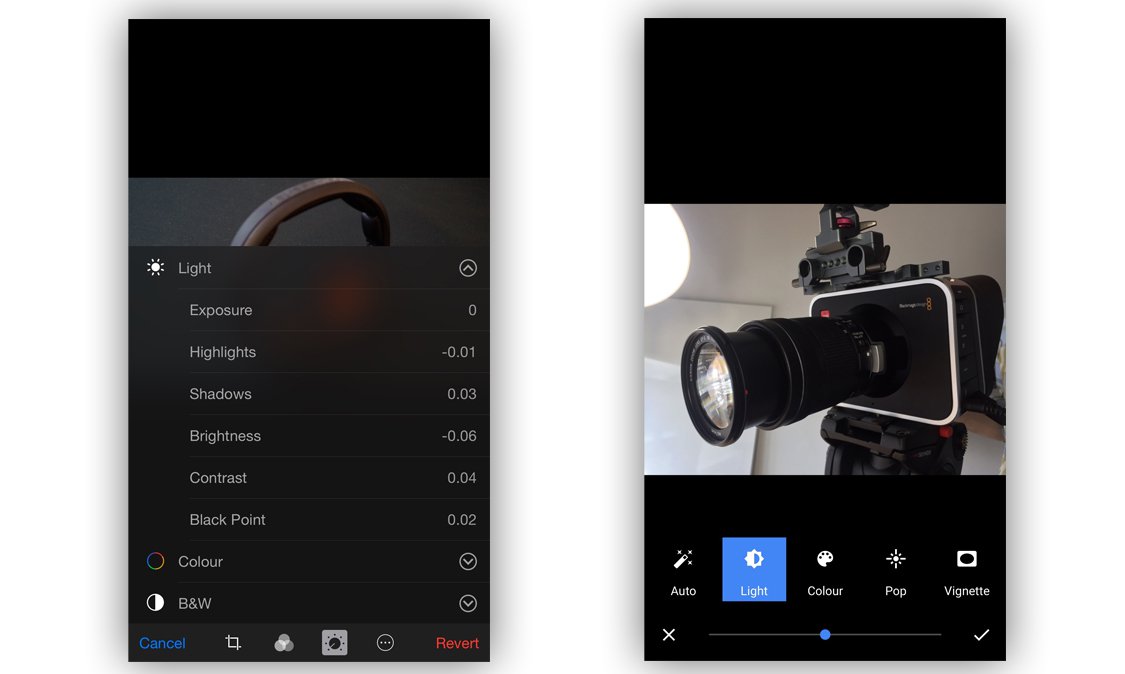
Let"s move on to another important aspect of any app that handles photos: editing. More specifically, photo editing. Google offers various editing tools to help spruce up your photos, including the standard "auto enhance" and a number of Instagram-esque filters for those of you that use them. It also offers tools to tweak the light, colour, "pop" (sharpness - we think) and vignette, however these are applied using sliders and offer no manual input.
Apple Photos vs Google Photos

Apple also offers auto enhancement, filters and controls over colour and light but takes it a step further than Google. As with Google Photos, edits can be applied using sliders - a consumer friendly way to enhance photos, and is perfectly acceptable for many people. However if you"re into photography and want extra functionality to enhance your photos, that"s also available. If needed, you can manually and precisely adjust:
  • Exposure

  • Highlights

  • Shadows

  • Brightness

  • Contrast

  • Black point

  • Saturation

  • Cast


If that"s still not enough, Apple has one more trick up its sleeve. Not only do Apple offer a set of tools built into the Photos app but you can edit photos within the Photos app using third-party editing tools (such as those used in Camera Plus).

That"s not it from Google Photos, though, as it has another impressive feature to offer. The analysis of your photos doesn"t only result in them being sorted into smart folders, as Google will also analyse them and suggest edits for you. These include GIFs, videos, collages and edits based on your photo library. If you like an edit that Google suggests, saving it won"t replace the original - it"ll be saved as a new file, accessible via the "Creations" folder within the app. These suggestions can be hit and miss, but we"ve also had some amazing GIFs and videos automatically generated for us.

We were initially concerned that these extra versions of our images would quickly clog up our iPhone memory, but all these versions are saved in the cloud (which means you need a web connection to view them). And there is no fear that the cloud space will quickly fill up either - Google gives up unlimited space for your photos (more on that below).

Incidentally, Apple doesn"t save extra copies of your adjusted images, it just saves the adjustments you have made in a file applies them to the photo when you view it.

Sharing


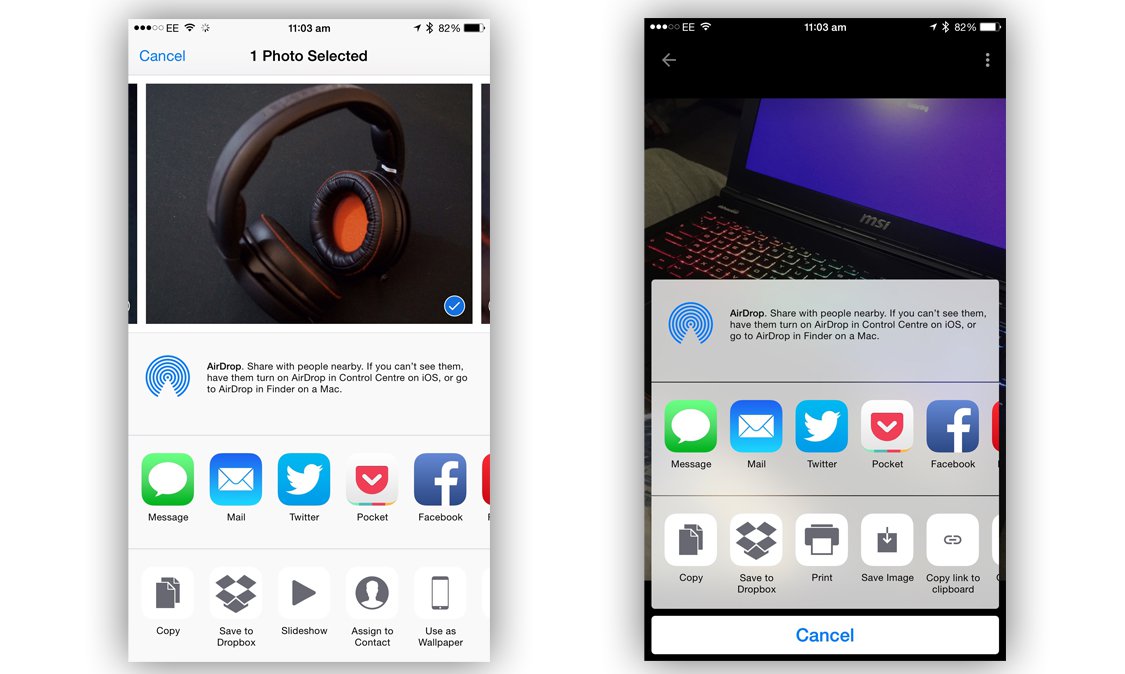
Sharing our photos online has become a daily occurrence thanks to the likes of Facebook and Instagram, so how do the two mobile titans handle photo sharing? iPhone users will be aware of the Share Sheet (part of iOS that appears in many different apps - it"s the icon that looks like a square with an arrow coming out of it). The Share Sheet displays a list of social networks and apps that you can share the selected file with (in this case, photos). This is what"s used primarily in the iOS version of Google Photos and Apple Photos, and performs as you"d imagine - simply tap the icon of the social network that you want to share the photo with. Nice and easy.


Apple also offers iCloud Photo Sharing via shared folders within the Photos app. You simply create a folder and add the email address of the person(s) you want to share the album with. Once created and shared, all members will be sent a notification whenever new photos are added. They can also add photos to the album. You can store up to 5000 images in a Shared Album. iCloud Photo Sharing also lets you create a pubic link to an album that anyone can view from a web browser (more on iCloud Photo Sharing below).

By default Apple stores your Photos in iCloud in My Photo Stream - you can store the last 1000 images, or 30 days worth of images for free. These images can come from any of your devices - even photos you"ve downloaded onto your Mac from your camera. If you want to store more photos you"ll have to pay though - Apple charges 79p a month for 20GB or £2.99 a month for 200GB for iCloud space.

This is the main thing that sets Apple Photos aside from Google Photos. Google Photos backs up your entire library to its servers, offering you unlimited space for free.
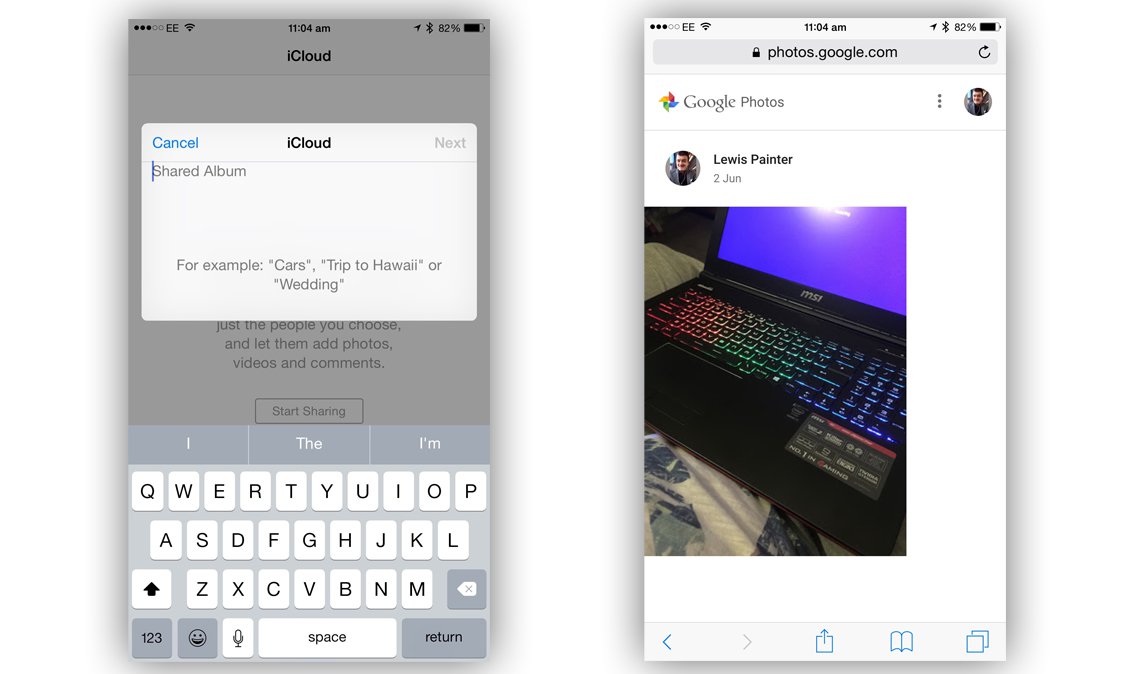


If you choose to share images with someone that person doesn"t need the Google Photos app, as the photos are accessible via web browser. The person in question can browse the photos and save them to either their device or Google Photos stream. If you want to revoke access to a link, simply delete it from the "Shared Links" menu from within the Google Photos app.

Accessing photos


Apple"s Photos app is available on every iPhone, iPad and iPod Touch running iOS 7 or later, and every Mac running OS X 10.10.3 as well as via iCloud on Windows. If you are on iOS 8.1, you also benefit from iCloud Photo Library, which means that if you have sufficient storage space on your iCloud account, your photo library should be synced between your Mac, Phone, iPad and iPod Touch and available on each device.
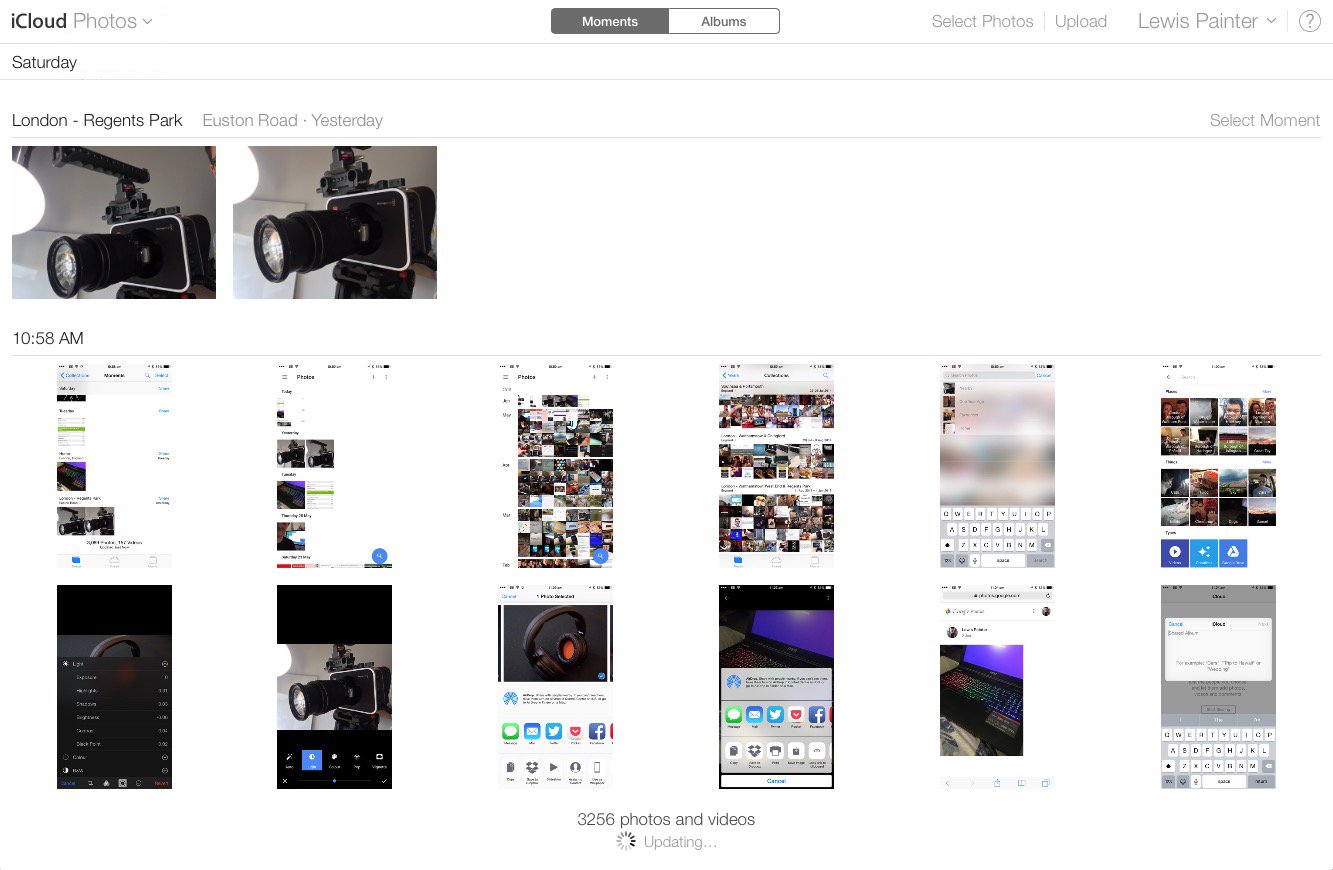


You can also access your iCloud Photo Library via the iCloud website, www.icloud.com. From here, log in with your Apple ID and click the Photos icon to access your complete photo library. You can download old photos as well as upload new ones through the iCloud website - very handy for use on a public computer.
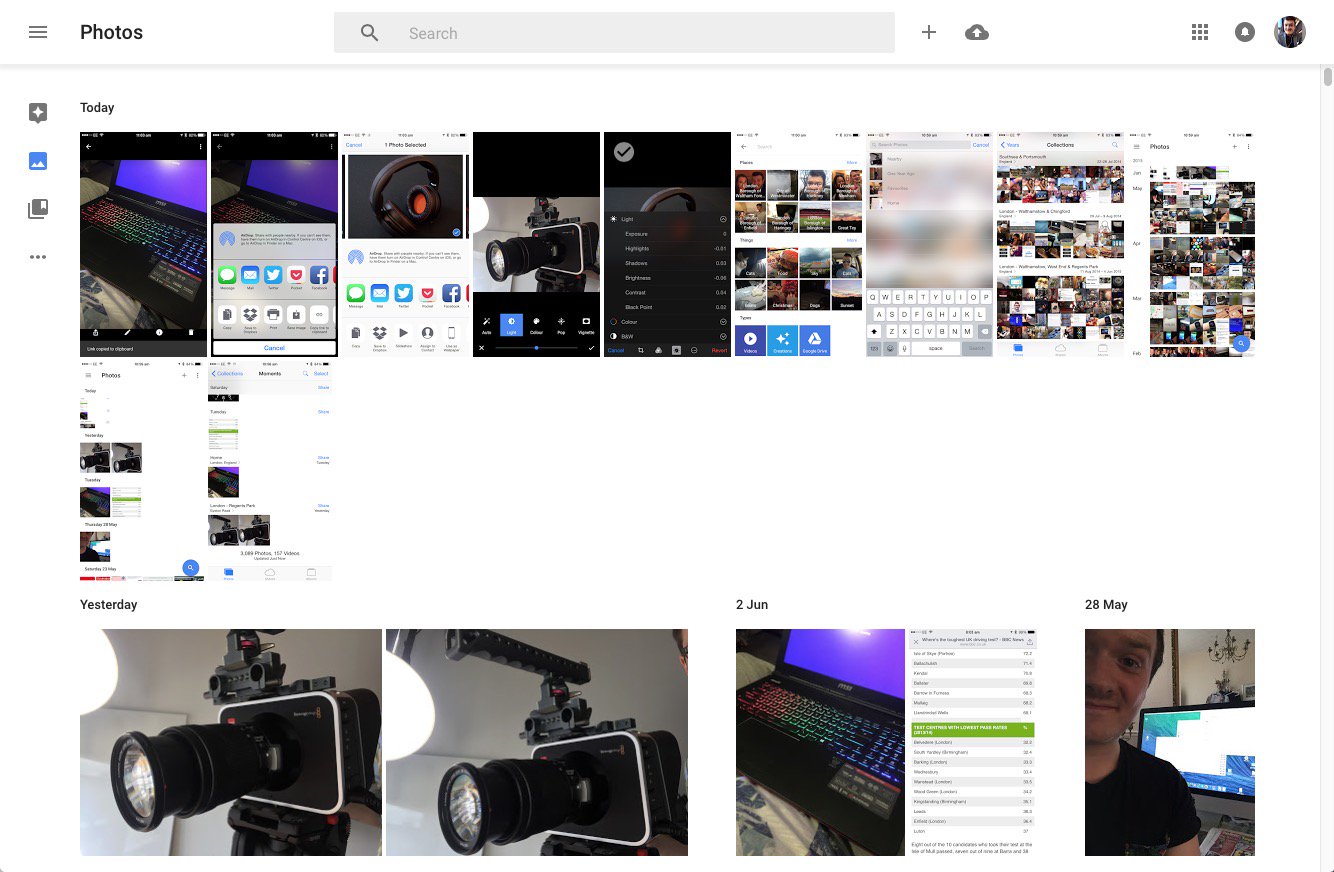


So, what platforms is Google Photos available on? It currently has an iOS and Android app, but no word yet on the Windows Phone platform. Much like Apple"s iCloud, Google Photos is also available via web browser at photos.google.com where you can view your photo library, download and upload new images.

It"s worth noting that the PC/Mac uploader does just that - upload photos. Unlike Apple Photos that has a Mac counterpart, there"s no native app for PC or Mac that allows you to browse your Google Photos library.

Cloud storage


Let"s talk storage, the most important factor in both Apple Photos and Google Photos. Apple"s iCloud is a cloud service that backs up not only your Photos, but your entire phone. The company offers 5GB of free storage, which for some users is okay, but others need more - which you have to pay for. 20GB is a reasonable £0.79 per month but if you need more than that, you"re forced to pay £2.99 per month for 200GB of storage.

Why is there such a jump? We want around 50GB, we"ll never use 200GB so why should we pay that much? It"s a lot of money to pay just to have access to all your photos all of the time. Which isn"t exactly a necessity. But then people might suggest that it"s not a necessity to have all your music on your device all the time, but that doesn"t stop people paying £21.99 a year for iTunes Match. Perhaps that is the sweet spot though - perhaps Apple should have priced it at around £25 a year, for 50GB, we"d be happy with that. £36 a year is just too much and 200GB is more than we really need.
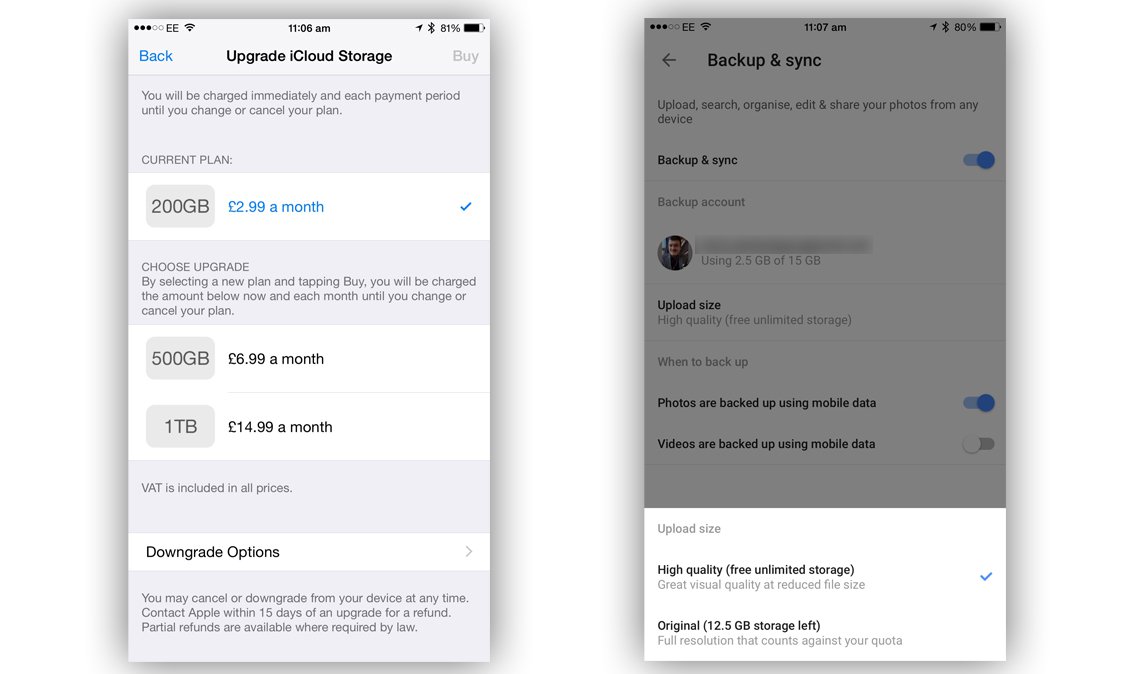


But why pay? Google has caught on to the frustrations of cloud service users and has offered something that the likes of Apple, Dropbox and Microsoft can"t (or won"t) compete with - completely unlimited photo and video storage, free of charge. Google Photos is available for iOS, Android and has a Mac and PC uploader so you can back up your entire photo library across all devices.

There are limits to what Google can offer though; the uploaded images and videos aren"t the original files, but are instead compressed copies. Google claims that it isn"t standard compression and that while the file size is minimised, there"s little or no affect on image quality. Magic, eh? There"s also a limit on resolution - 16MP for photos and 1080p HD for videos, and while you can still upload larger files, they"ll be shrunk down.

Of course, you still have the option to upload full quality original files, but this will eat up your Google Drive storage, which does cost you (you get 15GB for free though, Apple only gives 5GB free space in iCloud).

Security and Privacy


So the real question is "what is Google getting out of this?" because we all know that nothing in life is actually free. Google analyses the photos and assigns them metadata that can be used to build a better picture of the user, which is then used to serve more relevant ads. And of course, more relevant ads mean more clicks and more money for Google.

Apple has a very different stance on mining personal data, believing that people have a fundamental right to security and privacy. Speaking at EPIC"s Champions of Freedom event in Washington, Apple CEO Tim Cooke had the following to say about Google"s new service:

"We believe the customer should be in control of their own information. You might like these so-called free services, but we don"t think they"re worth having your email, your search history and now even your family photos data mined and sold off for God knows what advertising purpose. And we think some day, customers will see this for what it is."

In response to claims of monetising the service, a Google spokesperson told us:

"Our first priority - as with most products that Google builds - is to get the user experience right. So we have no monetisation plans at this time. Google Photos will not use images or videos uploaded onto Google Photos commercially for any promotional purposes, unless we ask for the user"s explicit permission."


Wednesday, 3 January 2018

2018 LG OLED and Super UHD TVs will have Google Assistant

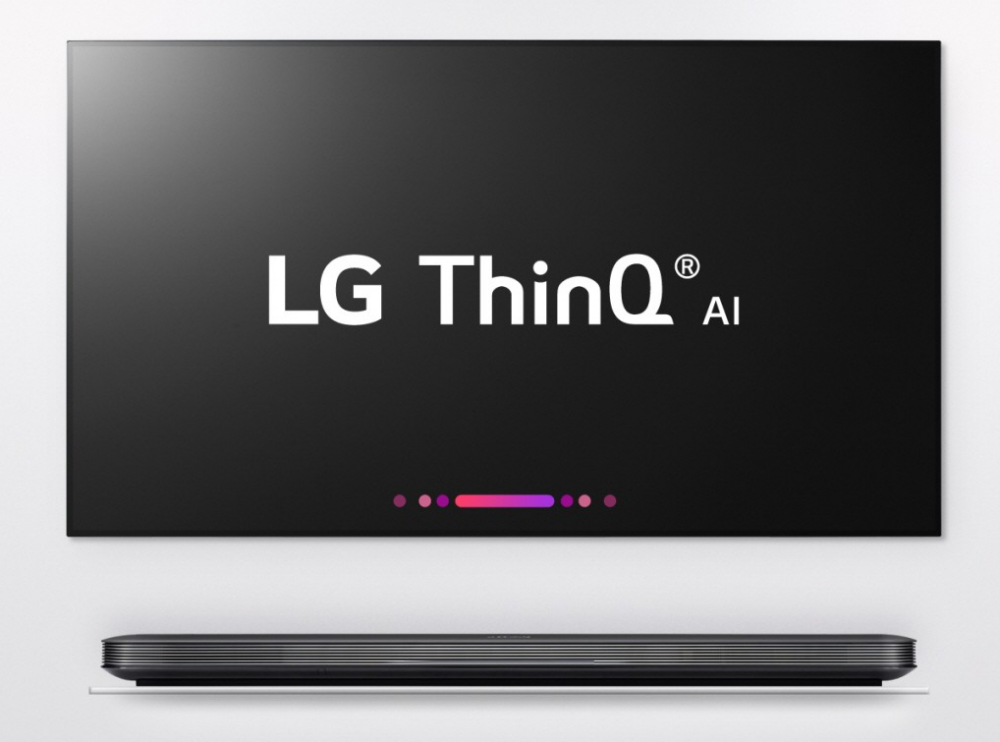
LG has announced some news that it’ll be fleshing out during CES 2018: its upcoming OLED and Super UHD TVs will have Google Assistant support via the maker’s ThinQ AI platform. Though LG doesn’t point toward Google Assistant specifically, instead saying that ThinQ will allow for “third-party AI services,” it includes an image of one of its flat screen TVs with Google Assistant visible on the screen.

LG will no doubt introduce its new high-end televisions during CES later this month, but ahead of that comes some details on changes the company has made. Chief among them is an expansion of the company’s ThinQ AI to its newest top-tier television models. With ThinQ, these TVs will be capable of fielding “hundreds of voice requests” via LG’s DeepThinQ, a deep learning technology, plus Natural Language Processing.


By doing this, users can, for example, search for videos using voice instead of menus. This is done much in the same way as new Fire TV devices — using the TV remote, which has a microphone built-in. LG gives a couple examples, including, “Show me all the movies this actor has starred in,” or something simpler like, “Show me yoga videos.”

Because ThinQ supports Electronic Program Guide (EPG) services, the platform can also be used to perform more TV-centric things like changing the channel or getting info about programming in real time. It can also perform more sophisticated commands like telling the TV to turn itself off once the current show has ended.

In addition to detailing its AI efforts, LG says that some of its new TVs will feature a new Alpha 9 image processor capable of 120fps, making it better for content with fast-moving action (like sports and action movies). The processor is also capable of much better color than previous hardware thanks to an improved color correction algorithm.

SOURCE: LG Newsroom

Tuesday, 2 January 2018

OnePlus: Google has labeled this app for OnePlus smartphones as "harmful"

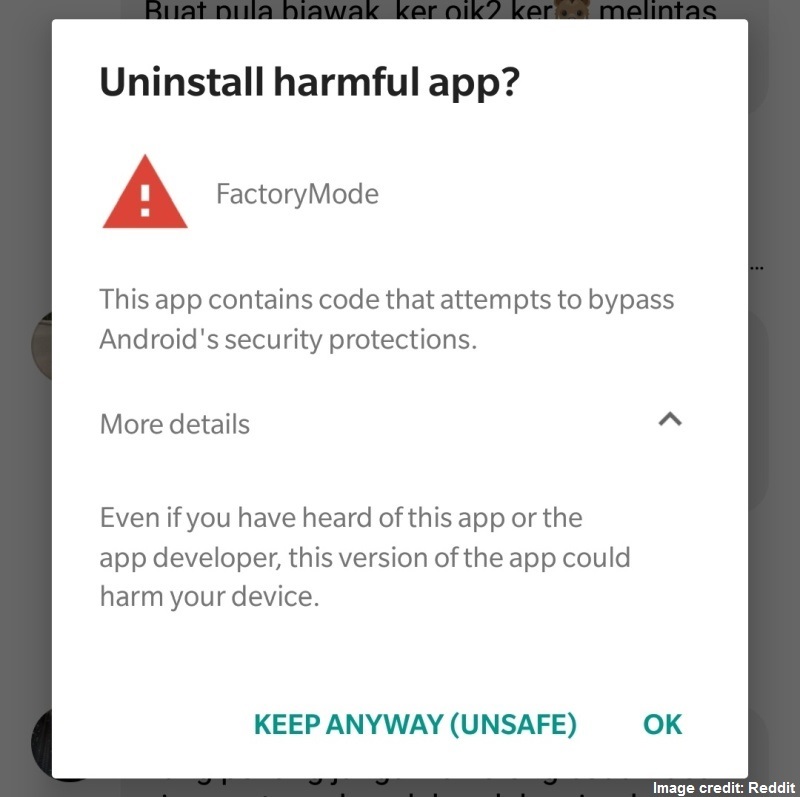
NEW DELHI: Google Play has started showing one of the apps in the OnePlus 3 and OnePlus 3T smartphones as "harmful". The app called "FactoryMode" was previously known as "EngineerMode" was at the centre of the controversy wherein it lets any user gain root access to the smartphone. OnePlus later fixed the bug in the app and rebranded it as "FactoryMode".

Several OnePlus 3 and OnePlus 3T users have reported about Google Play placing FactoryMode as a "Harmful app" ever since the roll out of OxygenOS 5.0.1. The search giant, in the alert card on the smartphone"s screen shows "This app contains code that attempts to bypass Android"s security protections." It adds that, "Even if you have heard of this app or the app developer, this version of the app could harm your device."


It is worth adding that users can still chose to keep the app or uninstall it as their wish. For those unaware, FactoryMode or EngineerMode is an app that is used to test smartphones as a part of their manufacturing process. The after sales team also requires it to check the device.

OnePlus started rolling out OxygenOS 5.0.1 for the OnePlus 3 and the OnePlus 3T late last month. The update brings support for aptX HD, Wi-Fi hotspot device manager and "adaptive mode" screen calibration. The update also brought the December security patch along with some general bug fixes and improvements.

The company just a couple of days ago introduced OnePlus 5 OxygenOS Open Beta 3 with Face Unlock feature, which until now was limited to OnePlus 5T. The beta version also includes app shortcut on Launcher, optimizations for vibration, fixed connection issue of 5G Wi-Fi and December security patch.

Since this is a beta version, users might come across some bugs and errors. Once users migrate to the beta patch, they will keep receiving beta OTA updates. Reverting back to the official OTA version would require full wiping of the smartphone.

Sunday, 31 December 2017

How to delete all your Google searches on desktop and mobile

NEW DELHI: Google is primarily used by millions of users around the globe for search queries. We tap on the shoulders of the search giant for tiniest of our queries, let it be for searching a place, information, opening a website or finding a food joint. It often happens that we search for several useless things on the web, which we may not want in suggestions next time we search for a similar term. For this, Google has given an easy way to clear all the searches ever made by you.

Here is how you can delete all your searches ever made on both smartphone and desktop right from one single place - My Activity.

My Activity by Google is a common tracker for all your searches across desktop and mobile, given that you are searching for those contents while logged in your Google account. It not only shows how many searches have you made using Chrome browser, but also gives you a detailed list of how many apps have you used and how many times on your Android smartphone. Regular search and image search are also shown besides other options such as what app did you search for on Google Play Store and on how many ads (that show up in search results) have you clicked on. It even shows your searches in bundles based on a website.

While you can delete several things using My Activity service by Google, today we"ll be giving you pro tips on how to delete your Google searches, by day, device, platform and even website. Below is the list.

On desktop

-Access Google My Activity by logging in to myactivity.google.com.

-Click on "Delete activity by"

-Chose the day, which includes today, yesterday last 7 days, last 30 days, all time and custom.

-Choose the "Product". Select "Search" and "Image Search" options.

-Click "Delete"

On mobile

-Search for the term "My Activity" on Google or log on to myactivity.google.com.

-Tap on the three-line menu icon on the top left corner of the screen.

-Tap on "Delete activity by"

-Chose the day, which includes today, yesterday last 7 days, last 30 days, all time and custom.

-Choose the "Product". Select "Search" and "Image Search" options.

-Click "Delete"

This is not just a nifty trick to clear your searches across platforms at one go, but can also prove to be of great help in tracking those who are snooping through your logged in device (mobile, tablet or laptop), searching for locations, address and more. Try this and let us know in the comments what you think about it.

Friday, 29 December 2017

Google Apps for Work (G Suite) 2016-17 review

[Editor"s Note: What immediately follows is a rundown of the latest developments and features Google has added to Apps for Work (G Suite) since this review was first written.]

December 2017

  • Auto-provisioning was enabled for 8 more third-party apps for G Suite Business/Enterprise customers, including: AWS, Evernote, GoToMeeting, Sugar, Zendesk and Office 365.

  • Google made life easier for admins by giving G Suite’s apps settings page, which lists core apps, a much more streamlined look and feel.

  • If the Device Policy app detects that an Android device has violated a company security policy, it will now disable all non-critical apps (i.e. those not needed for the device to function).

  • And for iOS devices, Google Mobile Management now allows admins to stop employees from syncing corporate data on jailbroken iOS hardware.

  • Google tuned up the menus in Docs and Slides, renaming certain tools and menu options to make them easier to find, and for better consistency across these two apps.

  • G Suite has new templates in four fresh categories in Google Docs, Sheets and Slides, including templates for HR, project management, freelancer engagement and sales.

November 2017
  • Google Sites was improved with the ability to create and easily manage site-wide page footers in a single place.

  • The Jamboard app for mobile devices was enhanced to enable users to create and edit objects in jams on their smartphones.

  • Google Docs and Slides now has a bigger font catalogue which supports 62 languages, and that includes non-Latin scripts like Cyrillic, with more on the way.

  • Google Docs, Sheets and Slides now allows users to (optionally) copy across comments and suggestions when they are duplicating a document, spreadsheet or presentation.

  • Google released a new kit for Hangouts Meet which contains all the hardware you need to hold high-quality video meetings using Google’s videoconferencing software.

October 2017
  • Add-ons for Gmail were launched, which let users access certain features of popular apps right from within their inbox, including the likes of Asana, QuickBooks and Trello.

  • Google Calendar on the web benefited from a redesign to make it look more like the mobile app, and some new features including the ability to manage multiple calendars side-by-side.

  • Google made it easier to compare and contrast different G Suite editions, and the firm also made it simpler for users to switch their subscription between these different editions.

  • A new version of the Google Contacts app emerged on Android, which introduced action buttons under a contact’s photo to start a chat or make a call, among other new features.

  • Hangouts Meet now allows G Suite Enterprise customers to use a dial-in phone number to join a meeting (audio-only) when out and about, if they don’t have an internet connection.

September 2017
  • Drive File Stream is now available to all G Suite customers, a desktop app which allows for easy and convenient access to all your Google Drive files on demand.

  • Google improved the Jamboard app to make it easier to use on your mobile device, and to allow users to present a jam to a meeting directly from their phone.

  • Google Sheets users have gained the ability to customize their headers and footers, and to choose from a range of predefined options (such as page numbers, dates and so forth).

  • Google Slides got some nifty tweaks including a new range of add-ons, plus integration with Google Keep, allowing you to drag notes directly from the latter into the former.

  • Gmail’s Email Log Search feature in the Admin console now allows admins to track the delivery of emails sent by users in their domain, and see the current status of those messages.

  • Google’s Jamboard finally went on sale in the UK (after being available in the US and Canada) with an asking price of £3,999.

August 2017
  • Google made its Contacts app available to a wider range of devices – basically to all hardware running Android 5.0 or better (including Samsung, LG and Motorola devices).

  • Google’s collaborative whiteboard, Jamboard, is now on sale in Canada for CA$6,949 (as opposed to just the US). With any luck it will come to the UK soon, as well.

  • Google boosted the collaborative powers of Docs, Slides and Sheets with the introduction of a new system that clarifies which version of a document collaborators are working on.

  • Following the introduction of anti-phishing security measures in the Gmail app for Android, those same capabilities that warn of suspicious links have arrived in the iOS app.

  • Google has made data loss prevention (DLP) functionality available for content stored in Team Drives (this feature came to Google Drive back at the start of this year).

July 2017
  • Google has tweaked the default apps which appear in its app launcher, so it will highlight more useful apps off the bat, such as Gmail, Google Drive and Docs.

  • Google Drive has been tweaked so employees can share files stored in Google’s cloud with folks who don’t have a Google account, providing admin permissions allow this.

  • Google’s Jamboard (collaborative digital whiteboard) now allows for duplicating objects, offers easier object selection, and boasts a new keyboard that supports ‘glide typing’.

  • G Suite benefited from the introduction of a new recruiting app: Hire lets employers keep tabs on potential candidates and allows for scheduling interviews and the like.

  • Hangouts Meet now offers a live chat function, so meeting participants can send messages or links in real-time, with a chat history available for the duration of the meeting.

June 2017
  • Google announced the imminent launch of a Backup and Sync app which automatically backs up files and photos from a PC onto Google Drive. The enterprise version will follow later in 2017.

  • G Suite admins benefited from the introduction of automatic provisioning for six new apps: Asana, Dialpad, Freshdesk, Lucidchart, RingCentral, and Smartsheet.

  • Google has extended the ability of G Suite admins to restrict certain users from creating Team Drives, and this functionality will be available indefinitely (instead of expiring in 2018).

  • Gmail admins received the ability to notify internal mail senders with an informative warning when a message gets quarantined due to an issue with compliance policies.

  • Google Vault was graced with a number of new features to make retrieving data a more accurate process, including detailed metadata for files exported from Google Drive.

May 2017
  • Google’s Jamboard, the massive collaborative digital whiteboard, went on sale in the US on May 23. You need a G Suite plan to use the 55-inch board which costs $5,000 (£4,100).

  • The Quick Access feature, which attempts to intelligently highlight the files you might need before you’ve even searched for them, arrived for Google Drive on the web.

  • Smart Reply – Google’s nifty system which automatically suggests quick responses to emails, in order to save you the effort – is coming to Gmail for Android and iOS.

  • Google added pre-integrated single sign-on support for 9 more third-party apps, including Asana, Dialpad, Evernote Business, Expensify, Keeper, Pagerduty and Trello.

  • Gmail on Android received a boost in security with the introduction of anti-phishing checks to warn users when they click on a suspicious link in a message.

April 2017
  • New settings were introduced in the admin console to allow for better management of users’ offline access to Google Docs, Sheets and Slides files.

  • Google Sites was improved with the introduction of the ability to add a logo to your site, which the app will intelligently scan for colours, and offer to use them across your theme.

  • For those firms that use Google+, which became part of G Suite last autumn, admins now have access to improved enterprise-focused reporting on adoption and engagement.

  • Google Cloud Search is now available as an iOS app (it was already on Android). The app offers a machine intelligence-powered, unified search experience across G Suite.

  • Google began the rollout of a refreshed Google Accounts login page, which has a new look and feel that’s designed to be consistent across phones, tablets and PCs.

March 2017
  • Gmail on the desktop has been improved so that when you receive a message with a video attachment, you’ll be able to preview the clip from right inside your inbox.

  • As part of an effort to better integrate G Suite with Salesforce, Google made it possible to export a Salesforce Opportunity List View directly to Sheets in order to bulk edit data.

  • Google announced that Jamboard, its giant digital whiteboard – billed as the ‘ultimate freeform collaboration experience’ for G Suite users – will be out in May costing $5,000.

  • Google launched a fresh app, Meet by Google Hangouts, a videoconferencing solution for businesses that allows for video calls with up to 30 group members.

  • G Suite saw the addition of the Google Keep app, an Evernote-style note-taking effort which you can now access from a sidebar panel in Google Docs.

February 2017
  • Google clarified that Hangouts users won’t be able to make video/audio calls in Firefox 52 due to plugins being disabled for security reasons, but it’s actively working on a solution.

  • Google Drive users can now view password-protected Microsoft Office documents in Drive, in read-only form – and this works for Gmail attachments, too.

  • Sheets (and its mobile apps) now supports the ability to rotate text within a cell, plus Google introduced new border styles and improved accounting number formatting.

  • Google also changed Sheets on the web so users can link to specific cell ranges, so for example it’s now possible to create a linked table of contents for your spreadsheet.

  • Want to insert videos directly from Google Drive into Google Slides presentations? You can now do exactly that, with a number of options to pick from such as autoplay.

  • Google Cloud Search was brought to G Suite, offering bolstered search functionality across the productivity suite, and machine intelligence-powered recommendations.

January 2017
  • Google added enterprise-grade controls and visibility to G Suite, including improved data control with Data Loss Prevention measures, and more scope for analytics.

  • It became easier to create documents and the like from templates, as the latter can now be accessed directly from Google Drive (rather than having to go into the G suite apps).

  • The mobile apps for both Google Docs and Sheets got a number of new features, including the ability to insert headers/footers, plus improved manipulation of images.

  • On the security front, Google made the decision to block JavaScript (JS) file attachments in Gmail (alongside the already barred EXE, BAT and MSC attachments).

  • Google made it easier to create group chats for teams in Hangouts, allowing for the easy creation and naming of ‘placeholder’ group chats which can be swiftly shared.

December 2016
  • Basic Mobile Management was introduced to G Suite, which lets admins implement basic security on iOS devices with no need for the user to install an MDM profile.

  • Google Sheets received some tuning, including a new setting to keep a limit on iterative calculations, and some interface improvements were made with the Android app.

  • Gmail has been improved to make ‘bounce’ messages – the notifications users receive when an email fails to be delivered – more easily understandable and informative.

  • Google bolstered the Explore feature (introduced in September) by making it dead easy to insert citations as footnotes in Docs, Sheets and Slides.

  • Finally, this past month, we discovered that G Suite is only half as popular as Microsoft’s Office 365, at least according to one survey of European enterprises.

November 2016
  • The mobile apps for Google Docs, Sheets, and Slides had a ‘trash view’ introduced whereby you can now see and restore previously deleted files.

  • Google opened up applications for the Early Adopter Program for the Team Drives feature in Google Drive, a new and more robust way of sharing files between teams.

  • Slides was tweaked to enable users to be able to save in the OpenDocument Presentation (ODP) file format for compatibility with the likes of LibreOffice and OpenOffice.

  • G Suite has introduced custom templates for Docs, Sheets, Slides, and Forms, so you can set up your own specifically tailored templates for colleagues to use as needed.

  • The overhauled Google Sites has been rolled out to all G Suite users, boasting a refreshed design, six new themes, and the ability to track performance with Google Analytics.

  • Google pushed out a new Gmail app for iOS with major changes including an improved design, better search functionality, and an ‘undo send’ option to retract email mistakes.

October 2016
  • It was announced that the Google Drive desktop app won’t be supported by Google for Windows XP, Vista or Server 2003 as of the start of next year, January 1, 2017.

  • The voice features of Docs got a serious boost, with the introduction of new commands to format text, and do things such as inserting links and comments.

  • Google teamed up with Slack so users of the team-focused messaging solution can directly import files from Google Drive, or create new documents from within Slack.

  • Google also announced that those using aged versions of the Google Drive desktop app should note that support for versions 1.27 or older will be discontinued in February 2017.

  • Google Docs now lets you include page numbers in the table of contents you can create for a document.

  • Google introduced integrated search functionality for Gmail, Calendar, Groups, and Drive on the web, meaning that search results will be pulled from across all of these.

September 2016
  • Google has renamed Apps for Work as G Suite, which the company says better reflects the software"s mission in terms of putting the emphasis on real-time collaboration.

  • Docs, Sheets and Slides witnessed the introduction of a new Explore feature consisting of intelligent assistants that help you craft better documents.

  • A new Quick Access capability was brought to Google Drive. It uses machine learning to automatically surface files it thinks you"ll need next based on your usage patterns.

  • Google rolled out a new offer for users of its productivity suite, with a free 60-day trial of Chrome device management which is good for up to 10 devices.

  • Google Drive made searching easier with the introduction of natural language processing, meaning that you can phrase your search in everyday conversational terms.

  • Google announced a partnership with Box whereby the latter will be integrated with Google Docs, allowing users to edit documents directly from Box"s cloud storage.

August 2016
  • A new Google Hangouts Chrome extension was pushed out allowing for multiple chat windows to be incorporated into one, and making more chat content readily visible.

  • Google introduced a "Cast…" function in the main menu of Chrome, and this can be used to share the contents of a browser tab – or the whole desktop – into a Hangout session.

  • Forms received a new feature which allows the insertion of images into surveys, so you can now do things like have a multiple choice question with pictures for answers.

  • The Android apps for Google Docs, Sheets, and Slides were improved to make it easier to create tables and better looking charts.

  • A couple of security tweaks were applied to Gmail, the most important of which is that the webmail service will now issue a warning about a link if it leads to a known malware site.

  • Inbox got integration with Trello and GitHub, so Trello users will receive a summary of what"s new with projects, and GitHub denizens will get a summary of code changes.

  • Google Drive"s preview feature was improved to make viewing previews of stored files a slicker experience, with a cleaner UI and better zoom functionality.

July 2016
  • Google introduced a new scheme to help train employees on its productivity suite, with the system designed to act like a "virtual coach" to help users learn when IT staff aren"t around.

  • Google tweaked the Admin app for Android to let delegated admins (and not just super admins) use the software to access functions while out and about.

  • Google gave the Admin console some attention in terms of two-step verification, allowing admins to view the real-time status of where each user is in the 2SV enrolment process.

  • Apps for Work is apparently being muscled out by Microsoft"s Office 365, at least if sentiment from Redmond"s Worldwide Partner Conference is on the money.

  • Google launched the new Quizzes feature in the Forms app, designed to allow teachers to easily create and mark assessments for students.

June 2016
  • Google Springboard was announced, a search tool (currently being tested) that can be used to quickly find things across Google Apps, plus it makes proactive recommendations.

  • Google Sites got revamped with a new preview version boasting a simple drag-and-drop design which is more intuitive, and support for real-time collaboration was introduced.

  • A "new and notable" section was introduced to the Google Apps Marketplace, in order to highlight the best third-party apps available to businesses.

  • The Android and iOS apps for Google Docs and Sheets gained the ability to edit content in Print layout view, and to edit existing conditional formatting rules in Sheets.

  • Google tweaked Docs, Sheets and Slides so notifications of comments made not only arrive via email, but you can also get a notification on your Android device or web browser.

May 2016
  • Google announced its new Spaces messaging app designed for small groups – but there"s no news as yet on when (or indeed whether) it will come to Apps for Work.

  • At Google I/O new APIs were introduced for Sheets, giving developers a "new level of access" to some of the most popular features in the app.

  • New APIs were also brought to Slides allowing developers to easily push data from other third-party apps into Slides for maximum convenience.

  • Google revealed that Android apps will be available for Chromebooks, and this opens up more productivity possibilities including using the Android version of Microsoft Word.

  • Google integrated its BigQuery service with Google Drive, allowing users to query files directly from Drive, and save query results from the BigQuery UI directly to Google Sheets.

  • Google Slides benefited from a new Q&A feature that lets audience members submit questions to the speaker directly from their mobile devices during a presentation.

  • The Synergyse service was fully integrated with Google Apps, a virtual assistant that helps train users in the various apps and was previously a Chrome extension.

  • Google Drive and Evernote were integrated, allowing Evernote users to seamlessly access any file on Drive.

April 2016
  • Google Apps for Work received two new certifications: ISO 27017 for cloud security and ISO 27018 for privacy.

  • A new "Find a Time" feature arrived in Google Calendar for Android, allowing mobile users to find convenient times for meetings when they"re on the go.

  • Google"s scheme of providing Apps for free to medium-sized firms who want to migrate over but are locked into an Enterprise Agreement was extended until the end of 2016.

  • Reminders pitched up in the web version of Google Calendar, and said reminders will sync across browsers and mobile devices.

March 2016
  • The Google Admin app received bolstered mobile device management capabilities, allowing for admins to handle security breaches even when they"re out and about.

  • Research into the most-used business apps on the web ranked Google Apps for Work in fourth place – behind Office 365, Salesforce.com and Box.

  • Google launched its #maketime website, which aims to help you prioritise how you spend time during work hours, and highlight how Google Apps for Work can save you time.

  • Google expanded support for its Identity Platform to cover logins for far more third-party apps in the Google Apps Marketplace, including Office 365 and Facebook at Work.

  • A whole bunch of new templates were added to Google Docs, Sheets and Slides.

February 2016
  • Gmail"s existing Data Loss Prevention features got a boost with the addition of OCR for scanning attachments and additional predefined content detectors.

  • Google also gave Gmail the ability to flag email accounts that it deems "insecure".

  • Google Docs was enhanced with voice typing, allowing users to dictate to their word processor, and also access editing and formatting commands.

  • Google Forms gained support for add-ons and the ability to edit Apps Scripts, plus work and education-related templates were introduced to the home screen.

  • The Gmail for Android app received support for rich text formatting, and an option for one-tap instant RSVPs was introduced.

January 2016
  • Instant comments were introduced to Google Docs, allowing users to click a simple icon to add an immediate comment to a document.

  • The ability to add comments arrived in the Sheets and Slides apps for both Android and iOS.

  • Google further bolstered the Sheets Android app with the ability to open and edit CSV and TSV files, along with additional files supported for import and export.

  • Google Calendar for Android and iOS apps was graced with smart suggestions that pop up suggested event titles, places and people.

  • Search became more powerful across Google"s productivity suite, so when users search from Docs, Sheets, and Slides home screens, they get results from across all three apps.

  • Google rejigged device management in the Admin console, categorising the various settings to make everything easier to find.


Now move on to Page 2 for our full review and detailed look at what Google Apps for Work offers, including an evaluation of features, pricing, and ease-of-use.

Google retires the Pixel C tablet as it shifts focus to the Pixelbook

As noted earlier today by Android Police, Google has stopped selling the Pixel C through its online store. It’s a quiet and not unexpected end for the company’s well-received tablet, designed to make room for Google’s latest and greatest.


The company confirmed that the end of sale also represents the end of life for the device, though Google added that it plans to continue supporting the hardware moving forward.


“As is common when a device has been out for a few years, we’re now retiring Pixel C and it is no longer available for sale,” the company said in a statement. “However, we are committed to updating and supporting it, including the recent update to Android 8.0, so customers can continue to get the best out of their device.”


And, of course, the statement wouldn’t be complete without a plug for its new premium Chromebook. “Our newly launched Google Pixelbook combines the best parts of a laptop and a tablet for those looking for a versatile device.”


Frederic gave the tablet good marks in a review back in 2015, but noted, “There is a market for the C, but I think it’ll be a small one.” That seems to be the case with many of the Google-branded devices, which means the company is essentially competing against itself for a relatively small slice of market share.


The shift from the C to Pixelbook does represent something of a larger trend for the industry in recent years, as many have moved from slates to convertibles. The Pixelbook isn’t as slim as a standalone tablet, and there are certain sacrifices when shifting between any form factors, but it’s a pretty solid tablet replacement for most instances. It’s also a much more well-rounded computing device.


The one big caveat here, however, is price. The Pixel C started at $599 (plus keyboard); the Pixelbook’s lowest SKU is $999. The tablets of the future are going to be much more versatile than their predecessors — and it’s definitely going to cost you.

Sunday, 24 December 2017

Google remembers Mohammed Rafi on 93rd birthday

NEW DELHI: Google on Sunday celebrates the 93rd birthday of legendary playback singer, Mohammed Rafi with a specially-curated doodle.

Born on December 24, 1924 in Punjab, Rafi is remembered as one of the most versatile singers of India, as his songs ranged from classical numbers to patriotic songs, sad lamentations to highly romantic numbers, qawwalis to ghazals and bhajans.

Further, Rafi is known for his ability to mould his voice to the persona of the actor, lip-syncing the song on screen in the movie.

Rafi is primarily noted for his songs in Hindi, over which he had a strong command. He sang around 7,405 songs in many languages. He sang in other Indian languages including Konkani, Bhojpuri, Odia, Punjabi, Bengali, Marathi, Sindhi, Kannada, Gujarati, Telugu, Magahi, Maithili and Urdu.


Apart from Indian languages, he also sang songs in English, Farsi, Arabic, Sinhalese, Creole and Dutch.


Among his noteworthy numbers include "Chaudhvin Ka Chand Ho", "Baharo Phool Barsao", "Kya Hua Tera Wada" and others.


Mohammed Rafi died at the age of 55 on 31 July 1980 in Mumbai, following a massive heart attack.


Rafi has six Filmfare Awards and one National Film Award to his kitty. In 1967, he was also honoured with the Padma Shri award by the Government of India.

Google Reveals What Searchers Wanted in 2017

The iPhone 8 and iPhone X ranked No. 2 and No. 3 respectively in overall searches on Google this year, and No. 1 and No. 2 respectively in the consumer tech search category on the
Google Trends Year in Search 2017 list released Tuesday. Bitcoin ranked No. 2 in global news searches, and "how to buy bitcoin" ranked No. 3 among how-to searches on Google in 2017.

The Nintendo Switch, Samsung Galaxy S8, and Xbox One X were the third, fourth and fifth most frequently used consumer tech search terms.

The lists are based on search terms that had a high spike in traffic in 2017 as compared to 2016.


"Those issues that directly touch the consumer, or are perceived to do so, will rise in search popularity," said Michael Jude, research manager at Stratecast/Frost & Sullivan.

A Few Surprises


The findings "probably correlated with the marketing budgets of the various vendors," Jude told. However, "I would have thought that some of the tech services -- connected home stuff, automatic backup services, etc. -- would have made the list," he said.


The inclusion of the Nintendo Switch came as a surprise to Rob Enderle, principal analyst at the Enderle Group.

"I would"ve thought handheld gaming-focused devices went obsolete years ago," he told.

Nintendo "has proven that they have a unique ability to bring concepts back from the dead," Enderle noted. The Nintendo Switch "looks like a crippled tablet in that it doesn"t support things most tablets do, but folks really like it as a dedicated gaming device."

Given the tie-in of Lenovo"s Star Wars: Jedi Challenges smartphone-powered augmented reality headset to The Last Jedi, Enderle thought it might make the list, but "I expect it came out too late to get enough search volume to move ahead of the Xbox X or any of the smartphones," he said.

Still, the AR headset, which is compatible with some iPhones and Android phones, "is selling very well and will go through updates -- so watch it for next year," Enderle predicted.

The Bitcoin Boom


"Bitcoin has been hyped tremendously in the press as everything from the next universal currency to a hedge against government debt default," Frost"s Jude said. "It"s no wonder that the general public is starting to take notice."

Interest in bitcoin and other cryptocurrencies is surging, and various commentators and investors predict bitcoin"s price could close in on the $1 million mark.

The Chicago Board Options Exchange launched trading in bitcoin futures Dec. 10 with the ticker symbol "XBT." Trading was halted twice that day as the futures surged.

The CBOE"s bitcoin futures fell 10 percent Wednesday, triggering a two-minute halt to trading.

The Chicago Mercantile Exchange will launch bitcoin futures trading on Dec. 17.

"Stories of people starting with (US)$100 of bitcoin and ending up multimillionaires likely contributed to the massive feeding frenzy on the cryptocurrency right now," Enderle suggested. "Anything that looks like a valid get-rich-quick path will almost always get a lot of attention."

Search Stats as Predictors


Search result statistics might indicate future trends, but given the rapidity of technological change, that might not hold less true for tech products.

Google"s 2017 search terms list "indicates point trends and shows that Apple still has a huge base of loyal buyers," Enderle said.

"It shows that in 2018, folks will likely get excited about anything that looks to make them rich, and they likely will still have an affinity for hot consumer devices," he added.

The search terms list "is a good bellwether, but you can"t really predict far into the future with it," Enderle said. "People are mercurial in this regard, and what"s hot this month may every well be anything but next month."

Friday, 22 December 2017

Former Google CEO Eric Schmidt is stepping down as Alphabet’s executive chairman


Alphabet has announced that former Google CEO Eric Schmidt will be stepping down from his role as Alphabet’s executive chairman. Schmidt will be transitioning to a new position as a technical advisor at the company as he continues to serve on Alphabet’s board.


Schmidt has served in senior roles at Google since 2001, when he was first brought on by Larry Page and Sergey Brin as the search giant’s chief executive. He stepped down from the role to serve as Google — and later Alphabet’s — executive chairman, a role he’s served in until today.


In a statement, Schmidt commented that "Larry, Sergey, Sundar and I all believe that the time is right in Alphabet"s evolution for this transition. The Alphabet structure is working well, and Google and the Other Bets are thriving.” He also noted that he’d continue to be expanding his work in science and technology issues and philanthropy.


Thursday, 21 December 2017

Google will require all Android apps to be 64-bit beginning in August 2019


Google announced today that it"s intending to get rid of all apps that aren"t built with a 64-bit framework in the future, although it"s fortunately giving developers and users alike until August of 2019 to switch over. After that, though, 32-bit apps are going the way of the dinosaurs.

The move is meant to prepare for a future version of Android that will only support 64-bit apps, and Google is billing it as an improvement for the platform"s security performance as a whole.

"For apps that use native libraries, 64-bit code typically offers significantly better performance, with additional registers and new instructions," the announcement post says.

In fact, it"s likely that many cross-platform developers are already prepared for the shift, as Apple already ended support for 32-bit apps in iOS 11 back in September.

One step ahead


The post, which is aimed at Android developers, also details new API level requirements. Under the new rules, developers will have to start specifically designing for Android Oreo"s interface beginning in August of 2018, even if the app doesn"t actually require Oreo.  Each time a new version of Android comes out, Google will update this requirement for the next year with a new version to target.

In addition, Google announced that it"s introducing security metadata that can prove if a particular app was authentically downloaded through the Google Play store, which should help reduce malware downloads.

The hope seems to be that the changes will result in a more stable and uniform Google Play store experience, much as you get with Apple"s comparatively (until now) stricter App Store.

The new guidelines are part of a larger push toward greater standardization of the Android experience, such as how Google now requires all new phones that ship with Android Oreo to support Project Treble, Android"s new auto-update feature.

Frustrated with Google, Amazon may be making a YouTube competitor


So it appears Amazon was a little more angry about YouTube getting pulled from the Amazon Echo Show than it initially seemed.

On December 5, the very day that Google yanked YouTube off the Echo Show for a second time, Amazon filed two trademark requests for a seemingly rival video streaming service with the US Patent and Trademark Office, as discovered by TV Answer Man.

A little hilariously, Amazon isn"t even being subtle. One of the trademark requests is for "Amazontube," while the other is for "Opentube." It"s not a stretch to imagine there will be a courtroom brawl with Google if the project ever goes lives with either name.

And the service sounds quite like, ahem, another popular service. According to the description, Amazontube or Opentube would let users access "non-downloadable pre-recorded audio, visual and audiovisual works via wireless networks" and share that work with other users.

These works, as you might imagine, could come from any number of subjects, and the request describes everything from games and movies to "sports instruction" and history.

Totally tubular


Not surprisingly, Amazon also looks eager to pair the rival service with its Alexa voice assistant. DomainNameWire discovered that Amazon has recently been snatching up a lot of domain names lately such as AmazonAlexaTube.com or AmazonOpenTube.com, none of which exactly roll off the tongue.

Judging from those unwieldy domain names, the whole thing might have been a somewhat laughable, impulsive show of force. Still, there"s always a chance we might see "AmazonTube" — after all, the removal of YouTube was a major blow for the device"s appeal. YouTube, though, is so firmly entrenched that it seems silly to attempt to compete (and such a rivalry would no doubt hurt existing competitors such as Vimeo).

It"s also possible the storm is already over. Amazon recently extended a peace offering to Google by announcing that it would start selling the Chromecast again. The problem, though, is that the device has yet to appear a week later, and it"s likely that the news of Amazon"s trademark requests won"t do much to patch up the larger issue.

Google quietly releases the Google Home Max

Back on the fourth of October, Google quietly announced their biggest smart speaker; the Google Home Max. there was no news about the gadget after that, but now it turns out that it has quietly made its way to stores.

The large smart speaker retails for about $399. Listings for the speaker was found on sites like best Buy and Verizon. They both say they can ship today. Funnily enough, Google’s own store still does not sell the speaker yet and visitors are greeted with a "join waitlist" message.

UPDATE : Google has since updated its site. You can now find the Google Home Max at the Google Store plus Walmart

Information on the Google Home Max


Starting off with the specs, this smart speaker comes with 4.5-inch high-excursion woofers and custom 0.7-inch tweeters. According to the company, this speaker will be about 20x more powerful than its smaller siblings. If true, this is a great feat that would allow the Google Home Max to cater to true audiophiles. There is an auxiliary port as well as many other features.

Sound Quality of the Google Home Max


This smart speaker sounds absolutely brilliant. The sound it emits is deep and clear with no sign of any distortions. For anyone who wants a true audio experience rest assured, this speaker will not disappoint.

Design of the Google Home Max


The design is quite minimalistic. While some might consider it bland, this allows the speaker to blend it to interior décor without seeming out of place. It can be used in two modes; either horizontal or vertical.

Performance of Google Assistant


Google assistant works just as you are accustomed to. You can ask it to change the temperature of your Nest thermostat or ask it questions. Basically put, this is an excellent device for those who are deeply embedded in the Google ecosystem.

Google Chrome will start blocking the most obnoxious ads on February 15


Surfing the web is about to become a much more pleasant experience for users of Google"s Chrome browser, as Google just announced that its highly anticipated built-in ad blocker will launch on February 15, 2018, reports VentureBeat.

This doesn"t apply to all ads: just the ones that make contemporary web browsing an occasionally maddening experience, as outlined by the Coalition for Better Ads. These include video-based ads that automatically start blaring audio, ads that hog the entire screen and ads that don"t let you see the content without enduring a countdown.

We"ve known the feature was on the way for a good chunk of the year, but only now do we have an actual launch date. As Google originally stated, the long lead time was meant to give site owners and ad makers an opportunity to prepare for the feature rather than shutting shutting down the ads immediately. Site owners could also get an Ad Experience Report that let them know if their sites would be affected.

The greater good?


Ideally, content providers and users alike have reason to look forward to this feature. For users, it obviously gets rid of the annoyance of having your reading pleasure interrupted by something like an autoplaying video ad, which, among other things, screams that you"re not properly focused on work to the rest of the office.

For content providers, it possibly means that fewer Chrome-based readers will continue resorting to using add-ons like AdBlock, which often wholesale blocks ads on a site. That means users are effectively getting the content for free, as no revenue goes back to the site for the visit.

Sites often don"t have much direct control over which ads get displayed, so a feature like this on the world"s most popular web browser will help automatically weed out the most obnoxious ads while leaving those that aren"t so intrusive. There should always be something showing, although only the "good" ads will remain.

Given enough time, that possibly means obnoxious ads in general will become rare, as ad makers will realize their content isn"t being seen. On several levels, unless you hate ads so much that the act of picking up a magazine leaves you reeling in horror, it"s a win-win for everyone.

The dangers of overreaching


As we mentioned in June, though, the concept isn"t without its dangers. In the worst-case scenario, Google itself could effectively create a monopoly on ads (though that seems unlikely).

"What"s more," we said at the time,"with Google the ultimate arbiter of good and bad ads, the search giant may be seen as wielding too much power – more so than it does now – in the online advertising game. "

The built-in ad blocker is only one feature that Google has planned for cleaning up the surfing experience. It"s also planning on releasing a feature that will prevent you from automatically being redirected to a new website in "early 2018," which mean we can expect it around the same time the ad blocker launches.

Google Chrome 64 brings a host of new features

Ads, autoplaying videos and pop ups are required on the internet but when they used in unintended manners, they can prove to be a headache to the users of the internet. Google has noticed that the biggest user complaints about Chrome for desktop is that users have to deal with a truckload of ads. The company looks to tackle the problem with Google Chrome 64.

What is in the new update?


The beta Google Chrome 64 update was released only a couple of days ago. Of course, the major headline of the update is its improved pop up blocker but it does have plenty of other significant changes.

Google is targeting annoying redirects that are disguised “play buttons” and “close”. These ads fool users into clicking them, which then directs them to other websites. Google says that Chrome will prevent these “abusive experiences” with version 64. However, its effectiveness remains to be seen. These ads are known to be difficult to remove.

Another handy feature on Google Chrome 64 is that you are given an auto mute option when it comes to auto playing videos. This is located within the site settings menu on the browser. Its located in the same place you will find Javascript and Flash enabling options. To access it, simply click on the green lock present next to a website’s URL. The downside of the feature is that you will have to enable it per website. This can be quite annoying for those who are doing some heavy surfing. But for those whose headphones, this is a vastly helpful feature.

The rest of the features include HDR support for those in HDR mode on Windows 10 and Split View multitasking features in tablet mode.

The Chrome Beta 64 is not yet available for Android but the regular version for desktops will be released in the upcoming few days.

Google Chromecast tips and tricks

For those who do not know, a Google Chromecast is a media streaming device that plugs into the HDMI port on your TV. The primary function of these devices are to stream video and content but they have a number of other interesting features that are worth exploring. We"ve detailed several tips that will immediately enhance your Chromecast streaming experience.

Turn on your TV and Google Chromecast without a remote


You have the ability to switch on your television and the Chromecast at the same time without even touching your remote. This is possible because Chromecast supports a common technology called HDMI-CEC. Although most HDTVs offer HDMI-CEC, you might have to enable the feature in TV settings.

Once CEC is enabled on your TV, you will be able to cast anything from your computer and mobile device. Your TV will automatically turn on, then switch to the correct HDMI input for Chromecast. It will then begin streaming your content.

Stream local video stored on Android devices


While most know how to stream local files from a computer to a Chromecast, not many know about sending videos stored on your mobile device to your TV. To do this you have to make use of a app that allows you to Cast. One such app is AlCast. Not just videos, you can throw pictures and even music. A handier feature is the ability to mirror your Android phone or tablet to the TV, meaning you can stream whatever is on your mobile screen to the big screen.

Play motion-controlled games


By combining your Chromecast and Android smartphone, one can play motion controlled games. These are called Chrome Experiments so do not expect huge game titles but there are plenty of small games that are worth trying out. Go to Super Sync Sports in your Chrome browser, then cast the page from your computer to your TV. After this sync your Android device to your computer. From there, follow the game"s on-screen instructions.